Claude Code status line: show your 5-hour and weekly limits
Add a Claude Code status line that shows context used and your 5-hour and weekly limits with reset times. A tested script, plus what each field means.
To show your usage in Claude Code, add a statusLine entry to ~/.claude/settings.json that runs a short script. Claude Code passes the script JSON on stdin, and for Pro, Max and Ultra subscribers that JSON includes your 5-hour and weekly limits as percentages with reset times. The script below prints them under your prompt, and it has been run against test data for the three situations you will hit.
Disclosure: we make Beckon, which comes up at the end. We ran the script before publishing.
Key Takeaways
- The status line is a script. Claude Code runs it locally and shows what it prints. It does not use API tokens.
rate_limits.five_hourandrate_limits.seven_dayare only sent for claude.ai Pro, Max and Ultra plans, and only after the first API response.- You can ask Claude Code to build one with
/statusline, or paste the script below and register it in settings.context_window.used_percentagecounts input tokens only, so it will not match a count that includes output.
How do you set up a Claude Code status line?
There are two ways, and the result is the same.
The quick way. Run /statusline with a plain-English request, for example /statusline show model name and context percentage with a progress bar. Claude Code writes a script into ~/.claude/ and updates your settings. Approve the file edits if it asks.
The manual way. Save a script, make it executable, and point statusLine at it. This is the better route when you want exact output, so the rest of this guide uses it.
A status line script for 5-hour and weekly limits
Save this as ~/.claude/statusline.sh. It needs jq, which you can install on a Mac with brew install jq.
#!/bin/bash
# Claude Code status line: model, context used, and the 5-hour and weekly limits with time to reset.
input=$(cat)
now=$(date +%s)

fmt() { # seconds -> "2h13m", "3d4h", "12m"
  local s=$1 d h m
  d=$((s / 86400)); h=$(((s % 86400) / 3600)); m=$(((s % 3600) / 60))
  if [ "$d" -gt 0 ]; then echo "${d}d${h}h"
  elif [ "$h" -gt 0 ]; then echo "${h}h${m}m"
  else echo "${m}m"; fi
}

limit() { # label, jq key
  local pct at out
  pct=$(echo "$input" | jq -r ".rate_limits.$2.used_percentage // empty")
  [ -z "$pct" ] && return
  at=$(echo "$input" | jq -r ".rate_limits.$2.resets_at // empty")
  out="$1 $(printf '%.0f' "$pct")%"
  if [ -n "$at" ]; then
    if [ $((at - now)) -le 0 ]; then out="$out (resetting now)"; else out="$out (resets in $(fmt $((at - now))))"; fi
  fi
  echo "$out"
}

model=$(echo "$input" | jq -r '.model.display_name')
ctx=$(echo "$input" | jq -r '.context_window.used_percentage // empty' | cut -d. -f1)

parts=("[$model]")
[ -n "$ctx" ] && parts+=("context ${ctx}%")
five=$(limit 5h five_hour); [ -n "$five" ] && parts+=("$five")
week=$(limit 7d seven_day); [ -n "$week" ] && parts+=("$week")

out="${parts[0]}"
for p in "${parts[@]:1}"; do out="$out | $p"; done
echo "$out"
Then make it executable:
chmod +x ~/.claude/statusline.shAnd register it in ~/.claude/settings.json:
{
  "statusLine": {
    "type": "command",
    "command": "~/.claude/statusline.sh"
  }
}
Claude Code reloads settings automatically and runs the script as soon as you save the file.
What the script prints
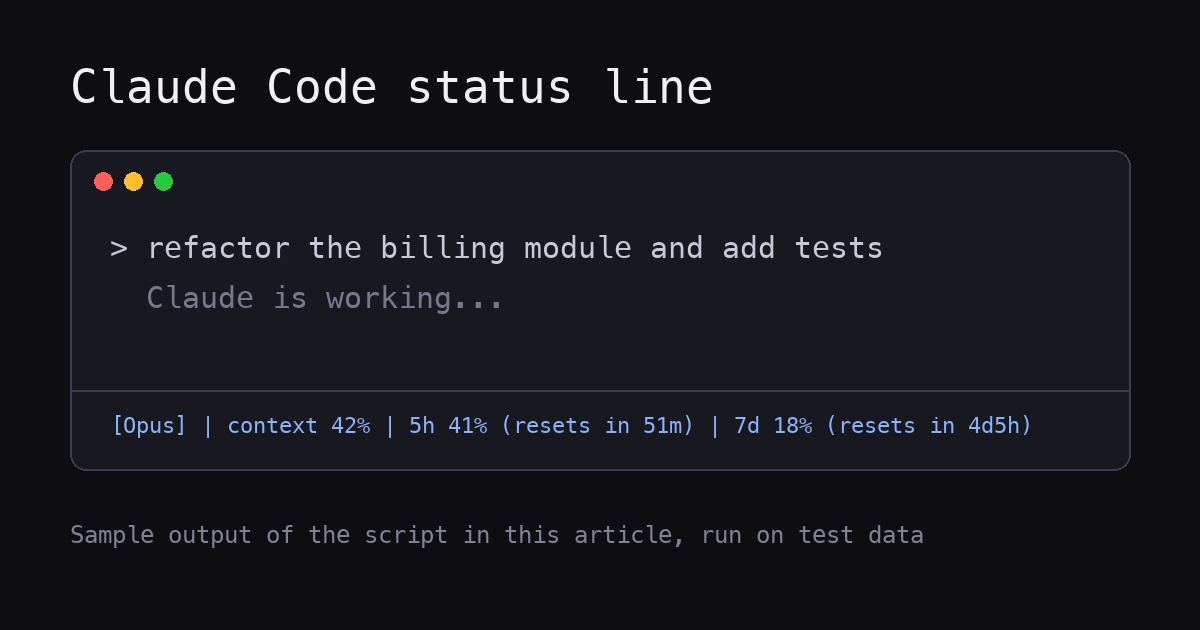
We piped sample JSON through the script for three situations:
| Situation | Output |
|---|---|
| Subscriber, mid-session | [Opus] | context 42% | 5h 41% (resets in 51m) | 7d 18% (resets in 4d5h) |
API user (no rate_limits in the data) | [Sonnet] | context 8% |
| Before the first response of a session | [Sonnet] |
If a window has already reset, the script prints (resetting now) instead of a negative time. These are test inputs, not your account. Your own numbers come from the JSON Claude Code sends.
When does the status line update?
Anthropic’s docs list the triggers: the script runs once when a session starts, then again when a new assistant message arrives, when /compact finishes, when the permission mode changes, and when Vim mode toggles. It also runs when a rate-limit window in the data it last received reaches its resets_at time. Updates are debounced by 300 ms.
If you want it to refresh while the session is idle, for example during long background work, add refreshInterval (in seconds, minimum 1) next to command. The docs say the status line runs locally and does not consume API tokens.
What to know before you rely on it
- Only for some plans. The docs say
rate_limitsis present for claude.ai Pro, Max and Ultra subscribers, or behind a Claude apps gateway with spend limits, and only after the first API response. Handle it being absent, as the script does with// empty. - Context percentage excludes output.
used_percentageis calculated from input tokens only (input_tokens,cache_creation_input_tokensandcache_read_input_tokens). - Cost is an estimate.
cost.total_cost_usdis computed locally at list price and can differ from your bill. - Footer hints go away. With a custom status line, Claude Code stops showing most footer keyboard hints, such as
esc to interrupt. - Windows is different. The docs give separate PowerShell and Git Bash examples. The script above is for macOS and Linux.
- Other tools exist. For example, ccusage lists a statusline integration, marked beta on its site.
What if you want the limits outside the terminal?
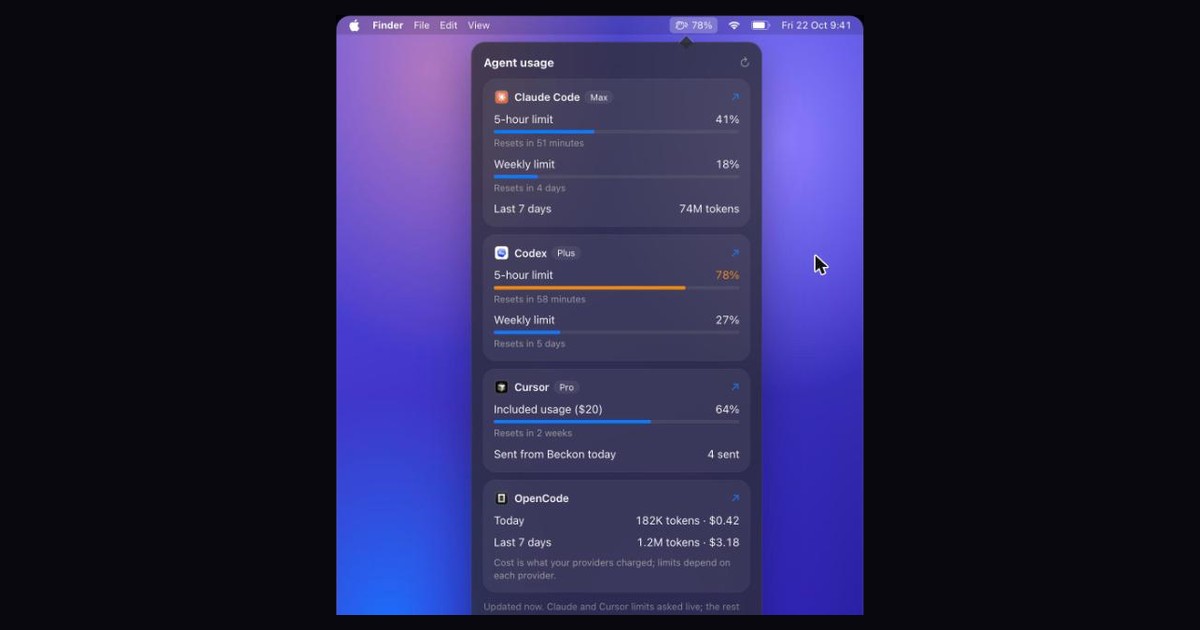
A status line only shows while a Claude Code session is open. If you also use Codex, or want the numbers in the menu bar while you work in another app, that is what Beckon’s usage panel does.
According to Beckon’s own page, it shows Claude Code and Codex 5-hour and weekly limits as percentages with reset times, plus Claude Code tokens for the last 7 days, and puts a number next to the menu bar icon when a limit passes 75%. Codex and Claude Code are read from their logs on your Mac, and Claude’s plan limits are asked live only if you turn that on.
It needs macOS 26 Tahoe or later and costs $39 once, with a 7-day trial for $5.99 and a 14-day refund window. If a status line is enough for you, you do not need it.
Frequently asked questions
Does the Claude Code status line use tokens?
No. Anthropic’s docs say the status line runs locally and does not consume API tokens.
Why is my 5-hour limit missing from the status line?
The rate_limits data is only sent for Pro, Max and Ultra subscribers (or behind a gateway with spend limits), and only after the first API response. If you use an API key, it will not appear.
Can I show git branch and cost too?
Yes. The JSON includes the working directory, cost.total_cost_usd and more, and the docs have examples for git status and multi-line layouts. Each echo in your script becomes a row.
Next step
To see Claude Code and Codex limits in the menu bar, see Beckon. For checking usage without a script, read how to check your Claude Code and Codex usage limits.
Sources
All retrieved November 12, 2026.
- Customize your status line, Claude Code Docs
- Manage costs effectively, Claude Code Docs
- Beckon (our product; features and price as stated on its page)
Get new MacMuse apps first
A short email when a new app ships or an app gets a big update. That’s it.