How to check your Claude Code and Codex usage limits on a Mac
Check Claude Code usage with /usage, Codex limits with /status and the usage dashboard, and keep both in your Mac menu bar. Updated November 12, 2026.
To check your Claude Code usage, type /usage inside a Claude Code session. On a Pro, Max or Ultra plan it shows your plan usage bars and what is using them. For Codex, open the usage dashboard at chatgpt.com/codex/settings/usage, or run /status in an active Codex CLI session to see your remaining limits. If you would rather not type a command every time, a few tools keep both numbers in the Mac menu bar.
This guide covers each way to check, why usage often climbs faster than you expect, and what to change when it does. It was written on November 12, 2026. Both vendors change their limits often, so where a number would go stale quickly, we point you to the source instead of repeating it.
Key Takeaways
- In Claude Code,
/usageshows plan usage bars for Pro, Max and Ultra. Its Session block is mainly for API users.- In Codex, the usage dashboard and
/statusare the two official places to see limits.- Long sessions burn usage because the whole conversation is re-sent with each request.
/clearbetween unrelated tasks is the biggest single fix.- Log-reading tools such as ccusage count tokens. Your plan’s limit is a percentage the provider tracks, so check it at the source.
- A menu bar app can show Claude Code and Codex limits at a glance. We make one, Beckon, and cover where it falls short.
How do you check Claude Code usage?
There are three official places: the /usage command, the status line, and Settings on claude.ai.
Run /usage inside Claude Code
Type /usage at the Claude Code prompt. What you see depends on how you sign in.
- Pro, Max and Ultra subscribers see plan usage bars, activity stats and a breakdown of what counts against the limits, with recommendations. The breakdown attributes recent usage to skills, subagents, plugins and individual MCP servers.
- API users care about the Session block at the top, which lists token counts and an estimated cost for the current session. Anthropic’s docs say this block is intended for API users, because subscribers’ usage is included in the subscription.
Press d or w to switch the breakdown between the last 24 hours and the last 7 days. The attribution and recommendation figures are approximate and come from session history on the Mac you are using, so other devices and claude.ai are not counted.
If the plan-limit request fails, /usage shows the last bars it loaded within the past 60 minutes with a “Showing last-known usage” note. Press r to retry. A message like “rate limited until 3:14am” means Claude Code can’t fetch your plan limits until then. It does not mean your work with Claude is limited.
Use the status line and claude.ai
Claude Code’s status line can display context window usage continuously, so you don’t have to run /usage to see how full a session is. For account-level settings, /usage-credits opens Settings > Usage on claude.ai (for Pro, Max and Ultra), where you can turn usage credits on or off and see your balance, this month’s spend and your spend limit.
When you reach a limit, Claude Code shows a session or weekly limit message with the time it resets. Anthropic’s docs describe a five-hour window and a weekly window for team and enterprise seats, and the individual plans follow the same session and weekly pattern in the messages you see. On Claude Code v2.1.234 or later, you can also choose to wait and continue the interrupted task automatically after the reset, from /rate-limit-options.
Run /insights for how you work
/insights is different: it doesn’t count usage. It analyzes your recent sessions on this Mac and writes an HTML report about what you work on and where requests went wrong. It is useful when /usage says something is expensive and you want to know why.
Why does Claude Code usage climb so fast?
Because Claude Code sends your full conversation with every request. Anthropic’s cost guide lists the usual reasons a long session uses far more than your activity suggests:
- Long context. Each request re-reads the history. With prompt caching that is cheaper, but a one-line question in a session open all day still draws usage for the whole conversation.
- Cache misses. The first message after a break longer than the cache lifetime reprocesses your full context.
- Scheduled tasks and goal check-ins. They fire while the session sits idle, and each sends your full context.
- Subagents and agent teams. Each one makes its own requests. The docs say agent teams use about 7 times more tokens than a standard session when teammates run in plan mode.
- Compaction.
/compactreads the conversation it summarizes, so compacting a large context is itself a large request.
What to change, in rough order of impact:
- Run
/clearbetween unrelated tasks. Use/renamefirst if you want to find the session later. - Match the model to the job. The docs suggest Sonnet for most coding and Opus for complex architecture or multi-step reasoning.
- Lower the effort level with
/effortfor simple tasks. - Keep
CLAUDE.mdshort. It loads at the start of every session, so move workflow-specific instructions into skills, which load only when used. - Run
/mcpand disable servers you aren’t using.
How do you check Codex usage limits?
Codex has two official places. OpenAI’s pricing page, retrieved November 12, 2026, says the usage dashboard is at chatgpt.com/codex/settings/usage and that during an active Codex CLI session you can run /status to see remaining limits.
Be careful with any blog’s numbers about Codex, including old posts in search results. The same page says Pro plans currently have no five-hour limit, that weekly limits may also apply, that local messages and cloud chats share your plan’s allowance, and that credits pick up when you reach your included limits. Messages-per-window estimates vary by model and have changed this year. We don’t quote them here because they would be out of date soon. The dashboard is the number that counts.
Do third-party usage monitors help?
Some do. Two common choices are open tools that read your local logs:
- ccusage is a command-line tool that tracks tokens and estimated costs from your local usage logs, across Claude Code, Codex and some other agents, according to its site.
- Claude Code Usage Monitor is a terminal tool for watching Claude token usage in real time.
They answer “how many tokens did I use, and what would that cost at list price?” That is not always the same as “how close am I to my plan’s limit?”, which is a percentage the provider tracks. For the second question, check /usage or the Codex dashboard.
How do you keep Claude Code and Codex limits in the menu bar?
Commands work, but they interrupt you. You check /usage after you have already hit the wall. A menu bar app shows the same numbers while you work.
Disclosure: we make Beckon, an app that brings up an AI agent with what’s on your screen. Its usage panel is one way to do this, and it isn’t the only one.
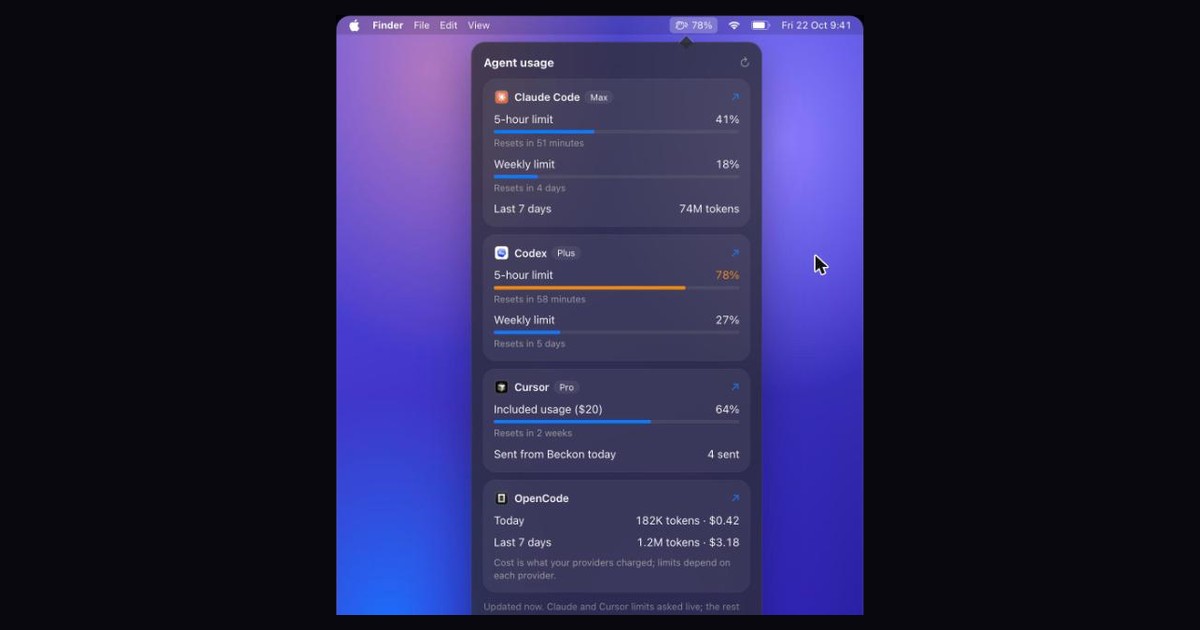
The panel at the top of this page is Beckon’s usage panel, with the sample numbers shown on beckon.macmuse.app.
What it shows, according to Beckon’s own page:
- Claude Code: the 5-hour and weekly limits, each as a percentage with a reset time, plus tokens for the last 7 days.
- Codex: the 5-hour and weekly limits, each as a percentage with a reset time.
- Cursor: included usage for the billing cycle, shown only with live limits turned on.
- OpenCode: tokens and cost for today and the last 7 days.
- Alerts: when a limit passes 75%, its number appears next to the menu bar icon.
Codex, Claude Code and OpenCode are read from their own logs on your Mac. Claude’s and Cursor’s plan limits are asked live with their sign-ins, and only if you turn that on.
Where it falls short:
- It needs macOS 26 Tahoe or later.
- The Claude and ChatGPT apps get no limit figures. The panel links to their usage pages instead.
- It costs $39 once for one Mac, with a 7-day trial for $5.99 and a 14-day refund window. If
/usageand the Codex dashboard are enough for you, you don’t need it.
Frequently asked questions
Does /usage count usage from claude.ai and other devices?
The attribution and recommendation figures don’t. Anthropic’s docs say they are computed from local session history on the machine you are using. For account-level settings and usage credits, use Settings > Usage on claude.ai.
Why did I hit my Claude Code limit so quickly?
Usually long context. Every request re-sends the conversation, so a session left open all day keeps drawing usage even for short questions. Run /clear between unrelated tasks and check the breakdown in /usage for what is behind your recent usage.
How do I see my Codex usage?
Open chatgpt.com/codex/settings/usage, or run /status in an active Codex CLI session. OpenAI says limits depend on your plan and the model, and that they change, so use these two places rather than a number from an article.
Is there a free way to see both in one place?
Not that we can verify. Claude Code’s /usage and the Codex dashboard are free but separate. Tools such as ccusage read local logs and count tokens across agents, which helps with cost but isn’t the same as your plan’s limit percentage.
Next step
If you use Claude Code and Codex together and want the limits one click away, see how Beckon’s usage panel works. If you are choosing between AI apps for your Mac, our comparison of the best AI assistants for Mac covers six options, and how we built Beckon explains what else it does.
Sources
All retrieved November 12, 2026.
- Manage costs effectively, Claude Code Docs
- Codex pricing and usage limits, OpenAI
- Beckon (our product; features and price as stated on its page)
- ccusage
Get new MacMuse apps first
A short email when a new app ships or an app gets a big update. That’s it.