Best AI assistant for Mac in 2026: 6 options compared
The best AI assistant for Mac depends on whether you want a chat app or one that sees your screen. Apple Intelligence, ChatGPT, Claude, Raycast and more.
The best AI assistant for Mac depends on what you want it to do. For everyday chat and writing, the ChatGPT and Claude desktop apps are the strongest picks, and Apple Intelligence is built into macOS on any Mac with M1 or later. If you want the assistant to see the app you’re working in, look at tools that capture screen context: ChatGPT’s Appshots, Claude’s quick entry, Raycast AI, or Beckon.
This guide compares six options on price, models, screen access, coding agents and macOS requirements. Disclosure: we make Beckon. It’s one of six entries here, and we say plainly what it can’t do.
What’s the difference between an AI chat app and a screen-context tool?
A chat app is a window where you type questions. It’s good for writing, research and thinking out loud, but it only knows what you paste or upload. If you’re stuck on an error in your terminal, you copy the error, switch apps, paste it, and explain where it came from.
A screen-context tool starts from what you’re already looking at. It captures the window, page, file or selection and sends it along with your question. That saves the copy, paste and explain step, which matters most when you ask about your work many times a day.
The line between the two is blurring. ChatGPT and Claude now both capture windows, and Apple’s Visual Intelligence works on whatever is on screen. The differences that remain are how much context each one reads, which AI models you can use, and whether you pay for a new subscription.
How do the AI assistants for Mac compare?
| Price model | Models | Sees your screen or app | Works with coding agents | macOS requirement | |
|---|---|---|---|---|---|
| Apple Intelligence | Included with macOS | Apple’s models; optional ChatGPT extension | Yes, Visual Intelligence | Not stated by Apple | Mac with M1 or later; newest features on macOS 27 |
| ChatGPT app | Free; paid plans (Go, Plus, Pro) | OpenAI’s models | Yes, Appshots and Screen context | Codex is built in | Not listed on OpenAI’s download pages |
| Claude app | Free; Pro $20/mo, Max $100/mo, Ultra $200/mo | Anthropic’s Claude models | Yes, screenshots and app windows | Claude Code is built in | Intel and Apple silicon; quick entry needs macOS 12+ |
| Raycast AI | Pro $10/mo or $96/yr, or connect your own subscription | OpenAI, Anthropic, Google, Perplexity; local models via Ollama | Yes, Screen Awareness | Not stated by Raycast | macOS Tahoe and Apple silicon |
| Perplexity | Subscription plans | 20+ models | Sees your active app | Not stated by Perplexity | macOS 15 Sequoia+ |
| Beckon (we make this) | $39 once, or $5.99 for 7 days; uses your existing AI subscriptions | Whatever your agents use | Yes, reads the page, file, PDF or terminal | Claude Code, Codex, Cursor Agent, Gemini CLI, OpenCode | macOS 26 Tahoe+, Apple silicon and Intel |
Prices and features checked on November 10, 2026.
What can Apple Intelligence do on a Mac?
Apple Intelligence is the free option you may already have. It needs a Mac with M1 or later, with your device and Siri language set to the same supported language. It also needs up to 14 GB of storage on some Macs.
On macOS 27, Apple’s macOS page lists these features:
- Siri AI, for open-ended conversation, questions about your photos, email and notes, and actions in apps like Messages and Reminders. It’s in beta, in a limited set of languages to start.
- Visual Intelligence, which lets you “learn more and take action about virtually anything onscreen.” You can also screenshot content and ask Siri AI about it.
- Write with Siri, which drafts text or gives feedback almost anywhere you type.
- Shortcuts that you describe in words, and Shortcuts builds.
ChatGPT is an optional extension you can turn on in System Settings > Siri > ChatGPT. Apple’s guide says you don’t need a ChatGPT account to use it, and Apple asks before sending your request.
Pick it if you want help with writing and quick questions without paying or installing anything. Apple doesn’t describe it as a coding tool.
What’s the ChatGPT shortcut on Mac?
In the current ChatGPT desktop app, Option+Space is the default global shortcut. It opens a small Quick Chat box from any app, and you can change it in Settings > Keyboard shortcuts.
The more useful shortcut for screen context is pressing both Command keys. That takes an Appshot: it sends the frontmost window to ChatGPT, including an image of the window and its available text, even text scrolled out of view. On macOS, it needs Screen Recording permission for the image and Accessibility permission for the text. With Screen context turned on, you can also say “Take a look at this” to share your frontmost window.
Since July 2026, Codex lives inside the same desktop app, and its Computer Use feature can see and operate Mac apps, according to OpenAI’s release notes. ChatGPT Work, for delegated tasks across your tools, needs a Plus, Pro, Business or Enterprise plan.
Pick it if you already pay for ChatGPT and want one app for chat, screen questions and coding.
Is there a Claude Code Mac app?
Yes. Claude Code runs inside the Claude desktop app, in its Code tab. You get parallel sessions, each in its own project folder, file-by-file diff review, an integrated terminal, and a browser pane where Claude can preview the app it’s building. The download is a universal build for Intel and Apple silicon Macs. Claude Pro includes Claude Code, at $20 a month or $17 a month billed annually.
For everyday questions, Claude’s quick entry opens when you double-tap Option in any app. You can drag to attach a screenshot, click a window to share it, or dictate by voice. You can switch the shortcut to Option+Space in Settings. Computer use, where Claude opens apps and controls your screen, is a research preview on Pro, Max and Ultra plans and needs macOS 14 or later.
Pick it if you write code with Claude, or prefer Claude’s writing for everyday work.
Is Raycast AI worth it, and what’s the alternative?
Raycast AI makes sense if Raycast is already your launcher. Quick AI answers from the same bar you use to open apps, and Screen Awareness gives the model “context from what’s on your screen.” You can pick models from OpenAI, Anthropic, Google and Perplexity, or run local models through Ollama. AI isn’t in Raycast’s free plan: Pro is $10 a month or $96 a year and includes 500 AI credits a month. Raycast also lets you connect your own API keys or Claude and ChatGPT subscriptions instead of using credits. The current app requires macOS Tahoe and an Apple silicon Mac.
If you’re looking for a Raycast AI alternative, the choice depends on why. If you don’t want another subscription, Apple Intelligence costs nothing extra, and Beckon is a one-time purchase that uses subscriptions you already have. If you want a different launcher, Alfred’s core app is free, but it has no built-in AI.
What about Perplexity on Mac?
Perplexity’s Mac app now centers on Personal Computer, which works with files in folders you connect and can operate Mail, Finder, Slack, Messages, Notes and other Mac apps. Its site says it “sees your active app” and uses teams of agents across 20+ models. It needs macOS 15 Sequoia or later.
One practical note: Perplexity’s site shows its shortcut as both Command keys, which is also ChatGPT’s Appshot default. If you install both, change one of them.
How do you ask AI about your screen on Mac?
You have four routes:
- Visual Intelligence with Apple Intelligence, on macOS 27.
- An Appshot in ChatGPT (both Command keys).
- Quick entry in Claude (double-tap Option, then drag or click a window).
- Beckon, which reads each app’s actual content instead of a picture of it.
Screenshots work in any app, but a picture of a window leaves out what’s scrolled away, and a code editor’s window doesn’t show your repo. That’s the gap we built Beckon for.
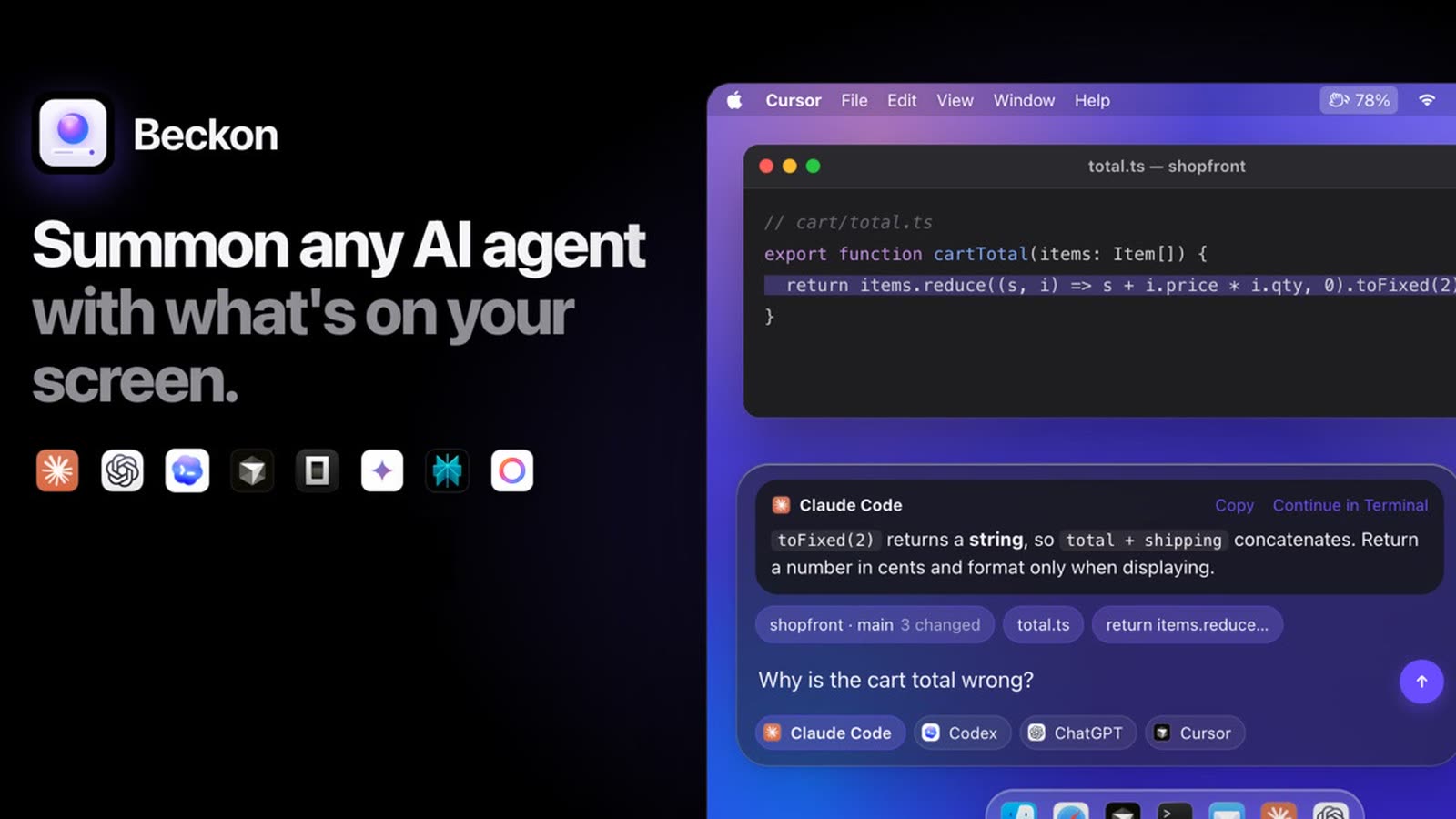
Beckon (we make this): press ⌥⇧Space in any app, and a bar rises with what you’re looking at already attached. In a browser, that’s the page and your selection. In a code editor, it’s the open file and the repo’s changes. In a PDF, it’s the full text, and in Terminal, it’s the error. Apps with nothing to read get a screenshot. Claude Code, Codex, Cursor Agent, Gemini CLI, OpenCode and Apple Intelligence answer right in the bar, and so do the Claude and ChatGPT apps. A menu bar menu shows every agent’s usage in one place.
Be clear about what Beckon is not:
- It isn’t a chatbot by itself. It has no AI of its own. It sends your question to agents you already have installed and signed in, and uses those subscriptions.
- It needs macOS 26 Tahoe or later. It runs on Apple silicon and Intel Macs, but not on Sequoia or earlier.
- It’s a separate purchase. It’s $39 once for one Mac, or $5.99 for a 7-day pass, with a 14-day refund window. It has no account and no analytics.
If you already pay for Claude or ChatGPT and switch to them many times a day, see what Beckon reads in each app or Beckon’s pricing.
Which AI assistant for Mac should you pick?
- You want free and built in: Apple Intelligence.
- You want one app for chat, screen questions and coding with OpenAI: the ChatGPT app with Codex.
- You write code with Claude: the Claude desktop app, with Claude Code in its Code tab.
- You live in a launcher: Raycast AI.
- You want agents that operate your Mac apps for you: Perplexity.
- You already pay for one or more AI tools and want them to see your work: Beckon.
For the rest of a new Mac setup, see our list of must-have Mac apps.
FAQ
Is there a free AI assistant for Mac?
Yes. Apple Intelligence is included with macOS on Macs with M1 or later. The ChatGPT and Claude desktop apps also have free plans.
Can ChatGPT see my screen on Mac?
Yes, when you ask it to. Press both Command keys to send the frontmost window as an Appshot, or turn on Screen context and say “Take a look at this.” macOS asks you to grant Screen Recording and Accessibility permissions first.
Can I use Claude Code on a Mac without the terminal?
Yes. The Claude desktop app has a Code tab that runs Claude Code sessions with a visual interface, diff review and an app preview. Claude Code is included in Claude’s Pro plan.
Do I need a new AI subscription to use Beckon?
No new one, but you need at least one AI tool. Beckon uses the agents and subscriptions you already have, such as Claude Code, Codex or Apple Intelligence. Beckon itself is $39 once.
Get new MacMuse apps first
A short email when a new app ships or an app gets a big update. That’s it.