Folio vs HoudahSpot: which Mac file search app fits?
Folio vs HoudahSpot: plain-English file search or detailed Spotlight queries? Prices, macOS support, trials and who should pick each, plus Find Any File.
Pick HoudahSpot if you want precise searches built from many criteria on top of Spotlight’s index, with saved templates and a text preview that highlights matches, on almost any Mac from macOS 10.14 up. Pick Folio if you want to type “pdfs from last week” and see them, browse your files by kind, and clear out old downloads and duplicates. If Spotlight can’t see a file at all, neither is the first tool to reach for. Try Find Any File.
We make Folio, so weigh our view with that in mind. HoudahSpot facts come from HoudahSpot’s site, its buy page and its download page.
Folio vs HoudahSpot at a glance
Prices and features checked on November 11, 2026.
| Folio | HoudahSpot | |
|---|---|---|
| Price and model | One-time: $9.99 for 1 Mac, $19.99 for 3, $29.99 for 5 | One-time: $39 single user (unlimited computers), $59 family; also on Setapp |
| macOS | 14 Sonoma or later, Apple silicon and Intel | 10.14 Mojave or later, Apple silicon and Intel |
| Search approach | Plain-English search; indexes on your Mac | Builds on Spotlight; combine criteria in boolean groups |
| Setup | Install and search; no account | Needs Spotlight indexing turned on |
| Privacy | Online only for license and updates; no account, no analytics | Not covered on its product page |
| Key features | Reads inside PDFs, library by kind, folder browser, Clean Up, Downloaded From, ⇧⌘Space panel | Templates, text preview with highlighted matches, multi-folder locations, AppleScript |
| Trial | No trial; live demo on its site; all sales final | Free trial in demo mode; 15-day money-back guarantee |
How the two apps search
HoudahSpot says it “builds upon macOS Spotlight.” It uses the index macOS already keeps, and gives you a search form with far more control than Spotlight’s own window. You add criteria, such as name, text, kind, date or author, and combine them into boolean groups. Because it needs Spotlight indexing turned on, it finds what Spotlight’s index holds.
Folio indexes and searches on your Mac and takes plain sentences. Type “screenshots over 5 MB” and it works out the type and size. It also reads inside PDFs. Search is only part of the app. Folio is also a place to browse and tidy your files.
Where HoudahSpot is better
HoudahSpot is built for people who want control over every part of a search.
- Precise queries. Combine criteria into boolean groups, and find files that share an attribute, such as images with GPS coordinates.
- Better text search. Search for words, prefixes or exact phrases, with
*as a wildcard. The text preview highlights matches and can fold to show only the text around them. - Templates. Save a search as a reusable template, and set your own defaults for new windows.
- Control over where it looks. Search several folders at once and include or exclude subfolders.
- Automation and export. Run searches from AppleScript, copy results as tab-delimited text, or print them.
- Runs on older Macs. HoudahSpot 6.8 needs macOS 10.14 or later and is compatible with macOS 27. Folio needs macOS 14.
- One license for all your Macs. A $39 single-user license covers one named person on unlimited computers. It covers every 6.x version.
- You can try it first. The trial runs in demo mode, which shows a message and adds a delay when you open a file from results. There’s also a 15-day money-back guarantee. Folio has no trial, and all sales are final.
Where Folio is better
Folio is for people who don’t want to build a query.
- Plain-English search. “pdfs from last week” or “screenshots over 5 MB” works as typed. No form, no operators.
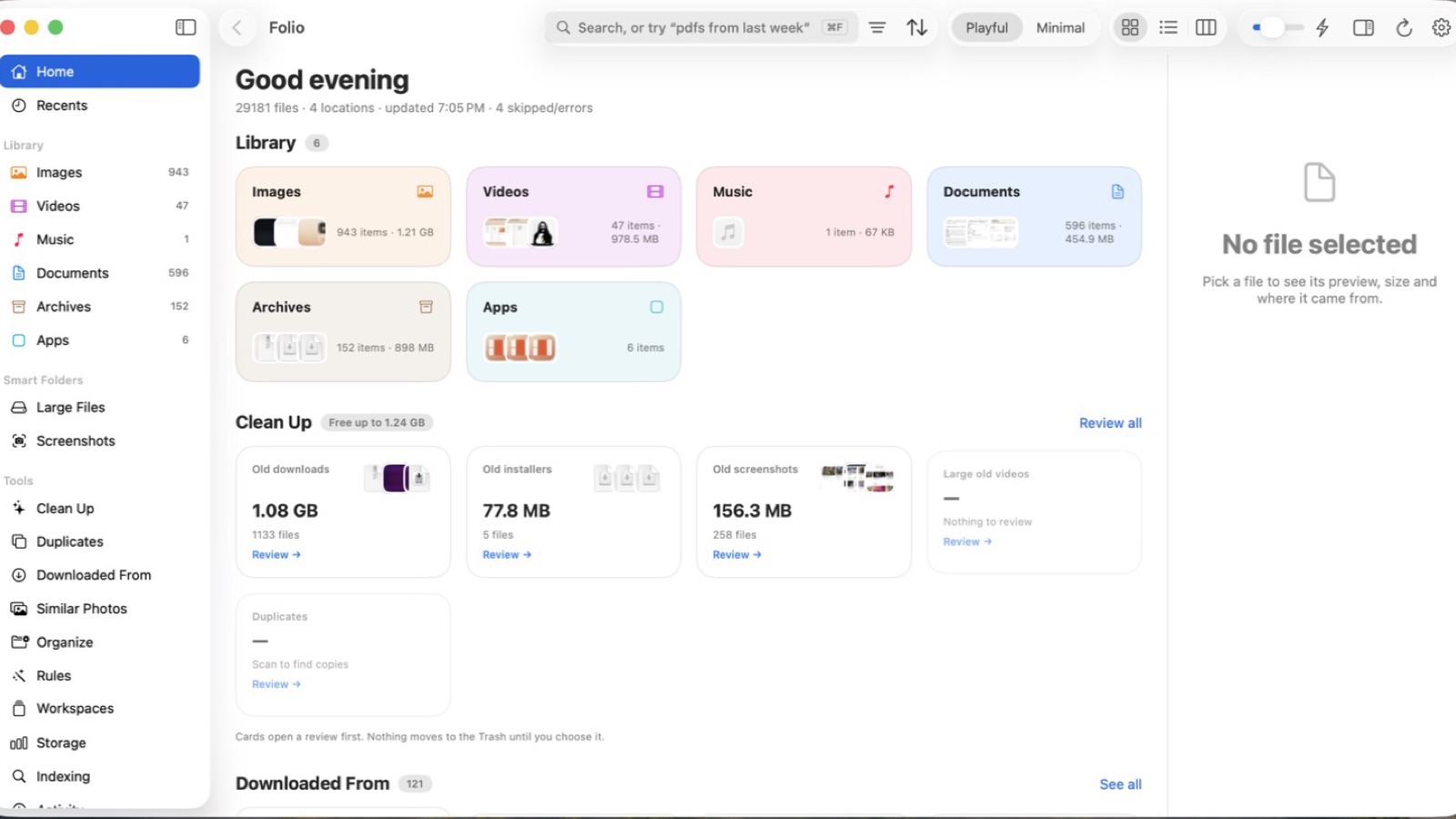
- A library by kind. Images, videos, music, documents, archives and apps, each with thumbnails and counts. You can browse instead of search.
- Every folder in one window. Grid, list or columns, with a clickable path bar.
- Clean Up. Folio totals old downloads, forgotten installers, stale screenshots and exact duplicates. You choose what goes. It goes to the Trash first, and Folio never deletes anything on its own. See how to find duplicate files on Mac for other ways to do this.
- Downloaded From. Folio groups downloads by source, like Gmail, ChatGPT, Slack, Google Drive and GitHub, using the “Where from” info macOS saves.
- A quick panel. Press ⇧⌘Space in any app to search just your files.
- Lower price for one Mac. $9.99 once. Even the 5-Mac license, at $29.99, costs less than HoudahSpot’s single-user license.
- Private by design. It indexes and searches on your Mac and goes online only for the license and updates. No account and no analytics.
Other Spotlight alternatives worth knowing
Find Any File is the tool for files Spotlight can’t see. It finds items on network and external drives, inside app bundles, and in System and Library folders. In root mode, after an admin password, it can search other users’ home folders on local disks. It’s $6 from the developer’s site or on the Mac App Store, you can try it free from the site, and version 2.6.1 supports macOS 10.11 through 27.
Raycast is a free launcher with a File Search feature. It previews files with Quick Look and lets you copy a file’s path or open it in Finder. Searching external drives needs Full Disk Access. Pro is $10 a month or $96 a year (pricing). The current version requires macOS Tahoe and Apple silicon.
Before you buy anything, make sure Spotlight itself is healthy. Our guide on how to find a file on Mac covers Spotlight’s Files mode, Finder search operators and how to rebuild the index.
Who should choose which
- Choose HoudahSpot if you search by many attributes, want saved templates and exact-phrase text search, or need to run on an older Mac.
- Choose Folio if you want to type what you’re looking for in plain words, browse files by kind, and clean up downloads and duplicates in the same app.
- Choose Find Any File if Spotlight simply doesn’t see the file.
- Choose Raycast if you already want a launcher and file search is a bonus.
FAQ
Does HoudahSpot use Spotlight?
Yes. HoudahSpot builds on Spotlight and needs Spotlight indexing turned on. If a folder is excluded from Spotlight, fix that first.
Is there a HoudahSpot free trial?
Yes. HoudahSpot is free to try in demo mode, which adds a message and a delay when you open a file. Purchases also come with a 15-day money-back guarantee.
What is a cheaper HoudahSpot alternative?
Folio is $9.99 once for one Mac and searches in plain English. Find Any File is $6 and finds files outside Spotlight’s index. Raycast’s file search is free.
Is Folio a subscription?
No. Folio is a one-time purchase: $9.99 for one Mac, $19.99 for three or $29.99 for five. There’s no account. It needs macOS 14 Sonoma or later.
Try Folio’s live demo
You can try Folio before you buy without downloading anything. The live demo on folio.macmuse.app runs in your browser with a sample library, so you can type a plain-English search and try Clean Up. Read the story behind the app in Introducing Folio.
Get new MacMuse apps first
A short email when a new app ships or an app gets a big update. That’s it.