MacMuse Recorder vs CleanShot X for screen recording
CleanShot X screen recording vs MacMuse Recorder: screenshots plus quick videos, or a dedicated demo editor. Price, zoom and export compared.
Pick CleanShot X if you take screenshots every day and record a short video now and then. It does both well, and it adds cloud links. Pick MacMuse Recorder if video is the main job and you want more control over zooms, camera layouts, captions and export formats. Some people will want both.
We make MacMuse Recorder. CleanShot X is one of the best Mac apps around, and this page says where it wins. Every CleanShot fact links to CleanShot’s own site.
CleanShot X vs MacMuse Recorder at a glance
Prices and features checked on November 11, 2026.
| CleanShot X | MacMuse Recorder | |
|---|---|---|
| Price and model | Basic $35 once with 1 year of updates, then $19/year optional; Pro $10/user/month billed yearly | One-time: $19.99 for 1 Mac, up to $69.99 for 5 Macs |
| Platforms and requirements | Mac only. macOS 13.0 or newer | Mac only. Apple silicon, macOS 15 or later |
| Recording sources | Full screen, window or custom area, with camera | Display, window, area, or camera |
| System audio | Yes, with the microphone | Yes, with the microphone (each optional) |
| Camera | Bubble with position, size and shape; full-screen mode | Bubble, split, floating and full-screen layouts; background removal or blur |
| Auto zoom | Yes, automatic smart zooms that follow the cursor | Yes, suggested from your clicks |
| Editable zooms | You can add zooms in the editor; its site doesn’t detail editing each one | Yes: move, retime, change the pace of, or delete |
| Captions | Video transcription listed with cloud features | Yes, transcribed on your Mac |
| Export formats | MP4 (H.264) or GIF | MP4 (H.264 or HEVC), GIF, ProRes 4444 with transparency |
| Aspect ratios | Landscape, square or vertical | 16:9, 4:3, 1:1, 3:4, 9:16 |
| Share links and cloud | Yes: one-click links and comments; 1 GB on Basic, unlimited on Pro | None. Recordings stay on your Mac |
| Trial | No direct trial; 30-day money-back guarantee; 7-day trial through Setapp | No free trial |
CleanShot details come from its features, screen recording, pricing and FAQ pages.
How good is CleanShot X screen recording?
Good, and better than many people expect from a screenshot app. You can record full screen, a window or a custom area as MP4 or GIF. It records your microphone and Mac audio together. It can show your clicks and keystrokes, add a camera bubble, and hide desktop clutter while you record.
Since CleanShot 5.0, its editor, called Studio Mode, adds smooth zooms that follow your cursor, with motion blur. You can trim, smooth the cursor, change click effects, and place the recording on a background with spacing and shadows. Then you export in landscape, square or vertical format.
For a quick bug report or a 30-second feature clip, that’s often all you need.
Where CleanShot X is better
- Screenshots. This is CleanShot’s main job, and it’s excellent at it: annotation tools, scrolling capture and more. Recorder doesn’t take screenshots at all.
- Cloud links and comments. One click uploads and shares a recording, with 4K support and comments. Basic includes 1 GB of storage. Pro has unlimited storage, a custom domain, password protection and team features. Recorder has no links.
- Older macOS. It runs on macOS 13.0 or newer. Recorder needs macOS 15 on Apple silicon.
- Risk-free purchase. There’s a 30-day money-back guarantee, and Setapp members can try it for 7 days. Recorder has no free trial.
- Keystroke display options. You can show all keys or only command keys, in dark or light style.
- Setapp. If you already pay for Setapp, CleanShot is included.
If you capture more images than videos, CleanShot X is the better buy.
Where MacMuse Recorder is better
Recorder is built only for video, so it goes further on the editing side.
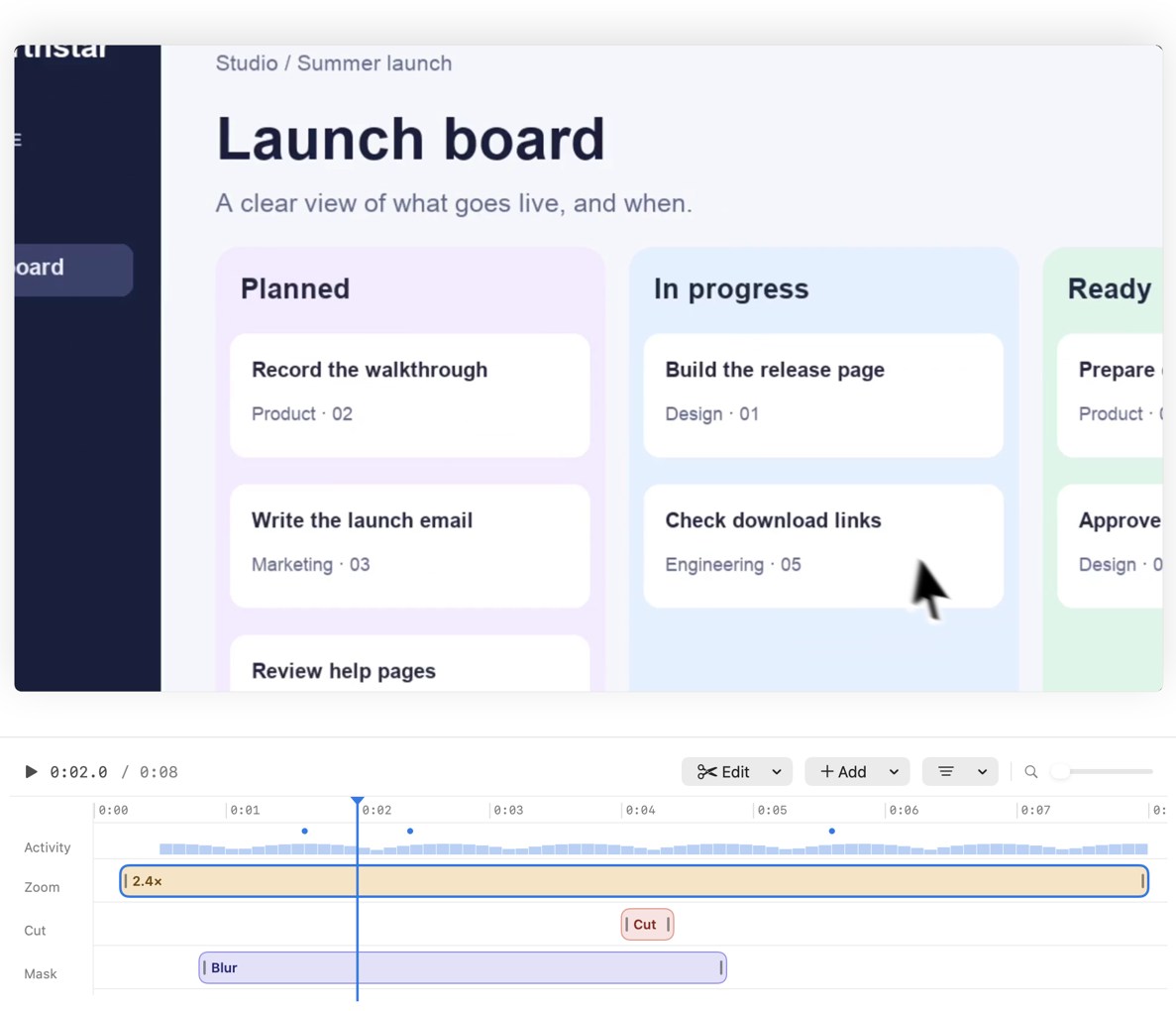
- Zoom control. Every zoom is a block on the timeline. You can move it, retime it, change how fast it moves, or delete it.
- Camera layouts. Bubble, split, floating and full-screen, with background removal or blur.
- Captions on your Mac. Recorder transcribes captions locally, with no upload.
- More editing tools. Cut pauses, speed changes, freeze frames, title and end cards, privacy blur and masks, and built-in music tracks.
- More export options. HEVC as well as H.264, plus ProRes 4444 with transparency. Five aspect ratios, including 4:3 and 3:4, from the same recording.
- Lower price. $19.99 once for one Mac, against $35 for CleanShot Basic.
- No cloud. Recordings and edits stay on your Mac. The app goes online only to check its license and look for updates.
What Recorder doesn’t have: screenshots, share links, comments, Windows, iPhone recording or a free trial.
What does each cost over 1 and 3 years?
For one person on one Mac, before tax.
CleanShot X Basic, keeping updates: $35 in year one. Then $19 a year to keep getting updates. Over 3 years, $35 + $19 + $19 = $73.
CleanShot X Basic, no renewals: $35 once. You keep the version you have after the first year of updates.
CleanShot X Pro: $10 × 12 = $120 a year. Over 3 years, $120 × 3 = $360.
MacMuse Recorder: $19.99 once. After 1 year and 3 years, $19.99.
Recorder costs $15.01 less than CleanShot Basic up front. But the fair question is what else you need. If you also want a screenshot tool, CleanShot covers both for $35, and buying both apps costs $54.99.
Is there a CleanShot X alternative for screen recording?
Yes. If you want a dedicated editor for product demos with editable auto zoom, MacMuse Recorder is $19.99 once. If you want links and comments, look at Loom or Cap; our Loom alternative for Mac guide compares them. For Screen Studio-style apps, see the best Screen Studio alternatives for Mac. For every kind of recorder, see the best screen recorder for Mac.
Who should choose each
Choose CleanShot X if:
- You take screenshots every day.
- Your videos are short clips for bug reports or chats.
- You want one-click cloud links with comments.
- You’re on macOS 13 or 14, or you use Setapp.
Choose MacMuse Recorder if:
- You make product demos, tutorials or launch videos.
- You want to edit each zoom and use split or full-screen camera layouts.
- You need ProRes with transparency, HEVC, or 4:3 and 3:4 crops.
- You want captions made on your Mac and nothing uploaded.
FAQ
Can CleanShot X record system audio?
Yes. CleanShot records your microphone and your Mac’s audio together, synced with the screen.
Does CleanShot X have automatic zoom?
Yes. Its site says the editor adds automatically generated smooth zooms that follow your cursor, and you can add zooms yourself. MacMuse Recorder suggests zooms from your clicks and lets you move, retime, change the pace of, or delete each one.
Is CleanShot X a one-time purchase?
Basic is $35 once with a year of updates. Renewing updates is optional at $19 a year. Pro is a subscription at $10 per user per month, billed yearly.
Does MacMuse Recorder take screenshots?
No. Recorder is a screen recorder and video editor only. You can use a screenshot tool like CleanShot X alongside it.
Next step
If video is your main job and you want to pay once, see MacMuse Recorder’s features and pricing. It’s $19.99 once for one Mac and runs on Apple silicon Macs with macOS 15 or later.
Get new MacMuse apps first
A short email when a new app ships or an app gets a big update. That’s it.