Loom alternative for Mac: hosted and no-subscription picks
Looking for a Loom alternative on Mac? Compare hosted tools with share links and recorders you buy once that export files. Prices checked Nov 2026.
The right Loom alternative depends on which part of Loom you need. If you need share links, comments and viewer analytics, use another hosted tool such as Cap, Tella or Vidyard. If you want a polished video you own as a file, with no per-seat subscription, use a Mac recorder you buy once, such as MacMuse Recorder, Cap’s Desktop License or CleanShot X.
We make MacMuse Recorder, so read our take with that in mind. Recorder doesn’t do what Loom does best, and this guide says so up front.
What does Loom cost in 2026?
Loom has four plans, per loom.com/pricing:
- Starter, free: 25 videos per person, up to 5 minutes each, at up to 720p. Comments, emoji reactions and viewer insights are included.
- Business, $18 per user per month: unlimited videos and recording length, up to 4K, upload and download, trimming and stitching, password-protected videos and no Loom branding.
- Business + AI, $24 per user per month: adds auto titles, summaries, chapters, filler word removal, editing by transcript and meeting notes.
- Enterprise: custom pricing, with SSO, SCIM and custom data retention.
Paying yearly saves up to 17%, per Loom’s FAQ. The page doesn’t list the yearly per-user price.
Two details push people to look elsewhere. First, the free plan’s 5-minute cap is tight for a real walkthrough. Second, Starter users can’t download their videos as files, per Loom’s help center. On paid plans, downloads come as MP4 and are limited by role.
The cost also scales with people. Five people on Business at the monthly price is $18 × 5 × 12, or $1,080 a year, before any yearly discount.
What does Loom do that a local recorder doesn’t?
Be honest with yourself about this part before you switch. Loom is a hosting service with a recorder attached, and the hosting is the point for many teams.
- Share links. You send a link instead of a file. No export, no upload step.
- Viewer comments and reactions. People reply on the video, at a point in time.
- Viewer insights. You see how your videos get watched.
- A team workspace. Folders and spaces for the whole company.
- Transcripts and captions in 50+ languages, plus AI summaries on the higher plan.
- Integrations with Slack, Jira and GitHub.
A local recorder gives you a file. You get full control over the edit, and the video lives where you put it. You don’t get comments or a view count unless the place you upload to provides them.
If your team runs on async video messages and reads the comments, a hosted tool is the better pick. Switch to a local recorder when what you make is closer to a finished video: a product demo, a help-center clip, a release video or a tutorial.
Loom alternatives compared
Prices and features checked on November 10, 2026. “Not listed” means the vendor’s own pages don’t say.
| App | Price model and current price | Share links | Viewer comments | Viewer analytics | You get a file | Best for |
|---|---|---|---|---|---|---|
| Loom | Free Starter; Business $18 per user/month | Yes | Yes | Yes | Paid plans only | Team video messages |
| Cap | Free for personal use; Desktop License $58 once; Pro $12 per user/month | Yes (25 a month on Free and Desktop, unlimited on Pro) | Yes, signed-in viewers | Pro only | Yes, Studio Mode exports | Open-source, closest to Loom |
| Tella | Pro $13 per user/month billed yearly; Premium $19 | Yes, hosted player | Not listed | Yes | Yes, export up to 4K | Hosted videos on your own domain |
| Vidyard | Free (5 recordings a month); Starter $59 per seat/month billed yearly | Sharing page on paid plans | Not listed | Paid plans | Not listed | Recordings plus AI avatar videos |
| Screen Studio | Subscription: $29/month, or $9/month billed yearly | Yes (up to 30 min) | Not listed | Not listed | Yes, MP4 or GIF | Polished auto-zoom demos with links |
| CleanShot X | $35 once with 1 year of updates; Pro $10 per user/month billed yearly | Yes | Yes | Not listed | Yes, MP4 or GIF | Screenshots plus quick recordings |
| MacMuse Recorder | One-time: $19.99 for 1 Mac, $69.99 for 5 Macs | No | No | No | Yes, MP4, GIF or ProRes | Polished demos you own, no subscription |
Which hosted Loom alternatives keep share links?
If you need links and comments, stay hosted. These are the options we could verify on each vendor’s own site.
Cap is the closest match to Loom. Instant Mode uploads during recording and gives you a shareable link when you stop. Shares can be public, private or password-protected, and signed-in viewers can leave timestamped comments and reactions. Studio Mode saves a local project you can edit and export as a file. The free plan is personal use only, with 25 share links a month up to 5 minutes each. The $58 one-time Desktop License adds commercial use and unlimited local recording. Cap Pro, at $12 per user per month or $8.16 billed yearly, adds unlimited links, viewer analytics, AI summaries and a Loom video importer. Cap is open source, runs on Mac, Windows and Linux, and can be self-hosted.
Tella hosts your videos with an embedded player. Per Tella’s pricing, Pro is $13 per user per month billed yearly, with unlimited videos, 4K export and analytics. Premium, at $19, adds a custom domain and removes Tella branding. There’s a 7-day free trial, a native Mac recorder, a Windows recorder and a Chrome extension. Clips can run up to 6 hours.
Vidyard pairs recording with AI videos and avatars. Its free plan allows 5 recordings a month, up to 30 minutes each, but doesn’t include video hosting. Starter is $59 per seat per month billed yearly, or $89 monthly, and adds a branded sharing page and analytics. That’s well above Loom Business, so it only makes sense if you want the AI video features.
Screen Studio and CleanShot X are Mac recorders that also host links. Screen Studio includes share links at 1080p for videos up to 30 minutes, on a $29 monthly or $9-a-month yearly subscription. CleanShot X includes one-click cloud links and comments, with 1 GB of storage on the $35 one-time Basic plan and unlimited storage on Pro.
What is the best Loom alternative with no subscription?
If you’d rather pay once and keep the files, you have three good Mac options and two free ones.
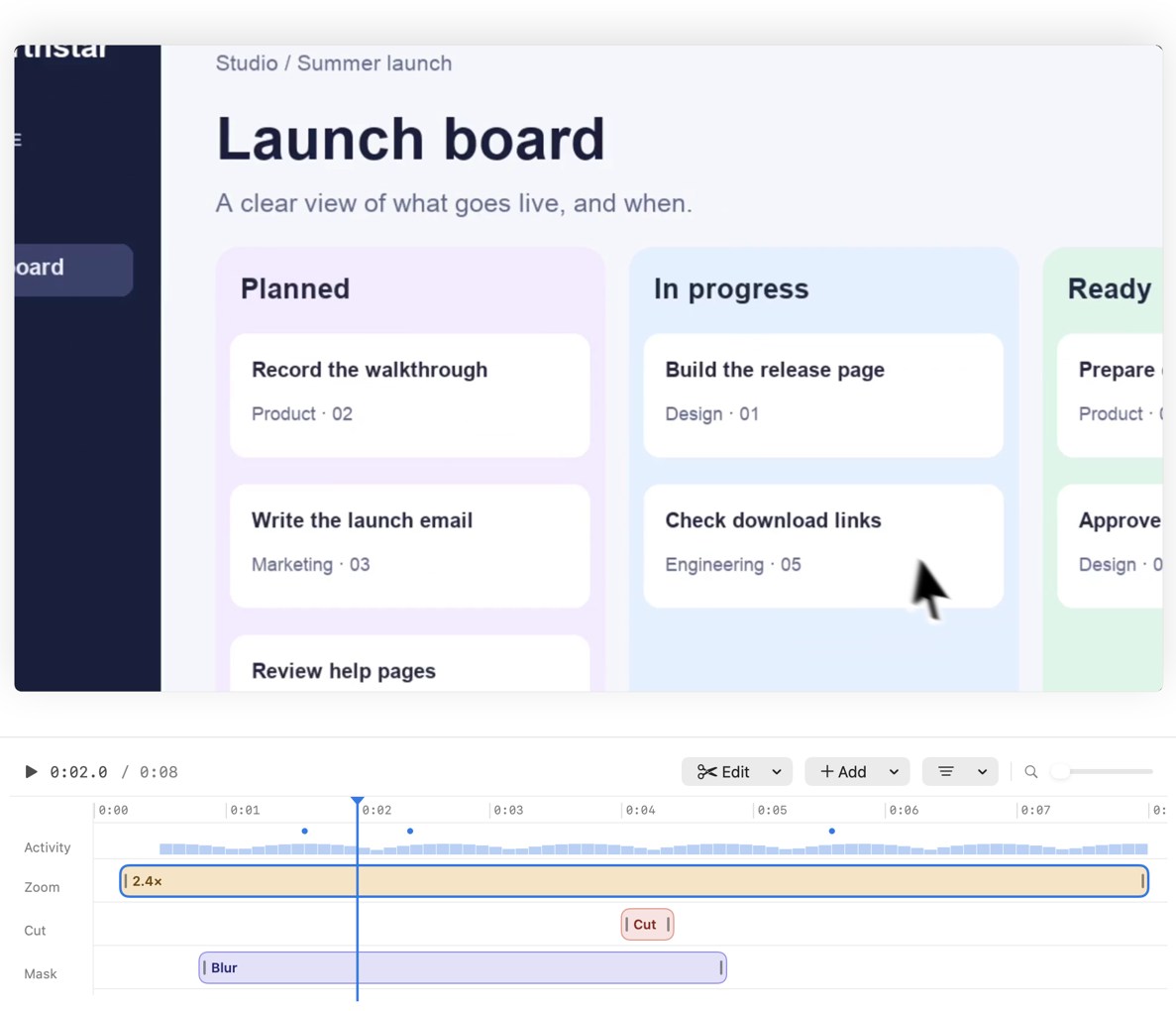
MacMuse Recorder is our app. It records a display, a window, an area or your camera, with optional microphone and system audio. It suggests zooms from your clicks, and every zoom is a block on the timeline you can move, retime, change the pace of, or delete. You can cut pauses, add title and end cards, add captions transcribed on your Mac, show shortcut keys, and blur parts of the screen you don’t want seen. The camera can sit in a bubble, a split, a floating window or full screen, with background removal or blur. You export MP4, GIF or ProRes 4444 with transparency, in 16:9, 4:3, 1:1, 3:4 or 9:16 from the same recording.
Your recordings and edits stay on your Mac. The app only goes online to check its license and look for updates. It costs $19.99 once for one Mac, up to $69.99 for five, with no account. It needs an Apple silicon Mac with macOS 15 or later.
What it doesn’t do: there’s no cloud hosting, no share links, no comments and no viewer analytics. There’s also no free trial and no Windows version. You export an MP4 and share it wherever you already share files: Slack, Google Drive, your help center or YouTube.
Cap’s Desktop License costs $58 once. It’s the best pick if you want local recording and editing but still need an occasional share link, since it includes 25 a month.
CleanShot X Basic costs $35 once with a year of updates and $19 a year to keep updating. Pick it if you take more screenshots than videos.
Free options. The macOS Screenshot toolbar (Shift-Command-5) records the screen, a window or an area with your microphone, and saves a .mov file, per Apple’s guide. OBS Studio is free and open source and records webcam and system audio on macOS 13 or later, though it has no editor and takes setup. Neither gives you links.
For a wider look at Mac recorders, including streaming and quick clips, see the best screen recorder for Mac.
Which Loom alternative should you pick?
Match the tool to the job, not the brand.
- Your team replies to videos and tracks views: stay on Loom, or move to Cap Pro if you want open source and a lower per-user price.
- You want Loom-style links for free: Cap’s free plan, if your use is personal.
- You want hosted videos on your own domain: Tella Premium.
- You want AI avatar videos alongside recordings: Vidyard.
- You want polished demos with auto zoom and links in one app: Screen Studio, on a subscription.
- You want polished demos you own, with no subscription: MacMuse Recorder. Then share the file where your viewers already are.
- You need a quick clip today, free: the Screenshot toolbar.
A test worth running: look at your last ten Loom videos. If most of them got comments or you checked who watched, you need hosting. If most were demos or tutorials you posted somewhere else, a local recorder will give you a better video for less money. Our guide on how to record a product demo on a Mac walks through that kind of recording.
FAQ
Is there a free Loom alternative?
Yes. Cap has a free plan for personal use with 25 share links a month, up to 5 minutes each. For recordings you keep as files, the built-in macOS Screenshot toolbar and OBS Studio are both free. Vidyard’s free plan allows 5 recordings a month but doesn’t include hosting.
What is the best Loom alternative for Mac without a subscription?
For polished demos with editable auto zoom, MacMuse Recorder at $19.99 once for one Mac. For local recording plus some share links, Cap’s Desktop License at $58 once. For screenshots plus short recordings, CleanShot X Basic at $35 once with a year of updates.
Can I download my Loom videos as MP4?
On paid plans, yes, depending on your role. Downloads come as MP4. Users on the free Starter plan can’t download videos, per Loom’s help center.
Does MacMuse Recorder have share links like Loom?
No. Recorder has no cloud hosting, share links, comments or viewer analytics. It exports an MP4, GIF or ProRes file to your Mac, and you share it wherever you already share files. If you need links, use Loom, Cap or Tella.
How much does Loom cost per user?
Business is $18 per user per month and Business + AI is $24, per Loom’s pricing page. Paying yearly saves up to 17%. Starter is free with 25 videos of up to 5 minutes each.
Try MacMuse Recorder
If what you make is a finished video, not a message thread, and you’d rather pay once than per seat, look at MacMuse Recorder for Apple silicon Macs. It’s $19.99 once for one Mac, your recordings stay on your Mac, and you export a polished MP4 ready to share anywhere.
Get new MacMuse apps first
A short email when a new app ships or an app gets a big update. That’s it.