Best Screen Studio alternative for Mac in 2026: honest picks
Looking for a Screen Studio alternative? We compare Cap, Screen Charm, CursorClip, FocuSee, Screenify and MacMuse Recorder on price, auto zoom and cloud.
The best Screen Studio alternative depends on why you are leaving. If you want free and open source, pick Cap. If you need Windows too, pick FocuSee. If you want a one-time price for a Mac app with editable auto zoom, look at Screen Charm, CursorClip, Screenify Studio or MacMuse Recorder. If you rely on share links with comments and view counts, Screen Studio is still a strong choice, and the subscription may be worth it.
We make MacMuse Recorder, one of the apps below. We say where the others do a better job.
How much does Screen Studio cost in 2026?
Screen Studio is subscription-only for new buyers. It costs $29 a month, or $9 a month on the yearly plan (about $108 a year). Both plans include every feature. Students and educators get 40% off.
Screen Studio used to sell one-time licenses. Its FAQ says those are “no longer available for new purchases.” Old licenses still work, and owners can renew to get new updates.
So the real cost question is time. After two years on the yearly plan, you have paid about $216. For many buyers, that recurring cost is the reason to look elsewhere.
What does Screen Studio do well?
Screen Studio is the app the others in this list are compared with, and it earned that. Here is what it does, according to its own site:
- Zoom. It suggests zooms from your clicks. You can also drop a zoom onto the timeline and point it at one spot. It offers two zoom styles, classic and loupe.
- Cursor. It records the cursor separately, so it can smooth the motion, resize the cursor and add click effects after you record.
- Editing. You can edit by transcript, remove filler words and pauses, trim, cut and speed up parts.
- Camera. It has full-screen, split, overlay and cutout layouts, with background removal.
- Audio. It records the microphone and Mac sound, including sound from only the apps you pick.
- Devices. It records an iPhone or iPad over USB.
- Sharing. Optional share links play at 1080p for videos up to 30 minutes, with comments and view counts.
Recording, editing and export run on your Mac. It needs macOS 13.1 or later, and there is no Windows version.
Screen Studio alternatives compared
Prices and features checked on November 10, 2026.
| App | Price model | Current price (USD) | Auto zoom | Editable zooms | Platforms | Local or cloud |
|---|---|---|---|---|---|---|
| Screen Studio | Subscription | $29/month, or $9/month on the yearly plan | Yes | Yes, on the timeline | macOS 13.1+ | Local editing; optional cloud share links |
| Cap | Free, yearly, one-time, or subscription | Free for personal use; Desktop License $29/year or $58 once; Cap Pro $12/user/month | Yes, from clicks | Yes, zoom segments | macOS 13.1+, Windows, Linux | Studio Mode is local; Instant Mode and Cap Pro use the cloud |
| FocuSee | Subscription or one-time | From $49.99/year or $19.99/month; Advanced lifetime $199.99 once | Yes, from clicks and typing | Yes, zoom track | Mac and Windows | Desktop app; plans include 5 GB cloud storage |
| Screenify Studio | Free, yearly, or one-time | Free with watermark; Pro $149 once or $119/year; Pro+ $249 once | Yes, from clicks and typing | Yes, zoom segments | macOS 13+, Apple silicon | Local; optional share links |
| Screen Charm | One-time | $99 launch price (regular $149), up to 3 Macs | Yes, after each click | Yes, per zoom: duration, level, cursor following, or remove | Apple silicon, macOS 14+ recommended | Local MP4 export; share links included |
| CursorClip | One-time, or monthly/yearly | $70 lifetime; free to record and edit, a license to export | Yes, while you record | Yes, move or remove a zoom | macOS 13.5+ | Local MP4, MOV or GIF export |
| MacMuse Recorder | One-time | $19.99 once for 1 Mac, up to $69.99 for 5 Macs | Yes, suggested from clicks | Yes, move, retime, change pace, delete | macOS 15+, Apple silicon | Local only; no share links |
Cap: the best free and open-source Screen Studio alternative
Cap is open source and runs on Mac, Windows and Linux. It has two main modes. Instant Mode uploads while you talk and copies a share link when you stop. Studio Mode records locally in full quality and opens an editor.
In Studio Mode, Cap can generate zoom segments from your clicks. You can move or resize each segment, set the zoom from 1x to 4.5x, and add zooms by hand. It also has camera layouts, captions transcribed on your machine, blur, backgrounds, cursor smoothing and 4K export. It records the microphone and system audio.
Pricing, from Cap’s pricing page:
- Free: personal use, Studio Mode with the full editor, 4K export, and 25 share links a month up to 5 minutes each.
- Desktop License: $29 a year, or $58 once. Adds commercial use. Works offline.
- Cap Pro: $12 per user per month, or $8.16 a month billed yearly. Adds unlimited cloud sharing, AI titles and summaries, viewer analytics and custom domains.
Pick Cap if you want a free option, need Windows or Linux, or want Loom-style links and Screen Studio-style editing in one app. It is the better pick than MacMuse Recorder for anyone who shares by link. Note that the free plan is for personal use. Client or company work needs a paid license.
FocuSee: best if you also record on Windows
FocuSee runs on both Mac and Windows. Its auto zoom follows your clicks and typing. Zooms sit on a zoom track you can adjust: you can add a zoom, set its level from 1.0x to 4.0x, split it, or turn it off, per its zoom guide. It also records mic and system audio together, records phones over USB, and has AI features such as avatars, filler-word removal and subtitles.
Pricing, from FocuSee’s pricing page:
- Standard: $49.99 a year or $19.99 a month, one computer.
- Advanced: $79.99 a year or $24.99 a month, up to three computers, with AI credits.
- Advanced lifetime: $199.99 once, up to five computers, with lifetime access to FocuSee 2.x. Version 3 will cost extra.
There is a free trial that lets you export one video. Most AI features use credits, which expire. Activation needs a FocuSee account.
Pick FocuSee if your team uses both Mac and Windows, or you want AI avatars and voice tools. The lifetime plan makes sense if you need several machines.
Screenify Studio: a Mac-only option with a free tier
Screenify Studio is a native Mac app for Apple silicon Macs on macOS 13 or later. It auto-zooms on clicks and typing, and puts zooms on their own timeline row, where you select a segment to change it (getting started docs). Its focus is 3D camera moves and device mockups, such as placing your recording inside an iPhone or MacBook.
Pricing, from its site:
- Free: unlimited recording and the full editor, but exports are 1080p, up to 5 minutes, with a watermark.
- Pro: $149 once with one year of updates, then $39 a year if you want more updates. Or $119 a year.
- Pro+: $249 once with lifetime updates and five devices.
The site labels these “Early Access” prices and says they will rise as AI features ship.
Pick Screenify if you want 3D camera effects or device mockups, or you want to try a full editor free before paying.
Screen Charm: the most complete one-time option
Screen Charm is a native Mac app for Apple silicon. It records a screen, window or area with camera, mic and system audio, adds zooms after every click, and lets you change each zoom’s duration, zoom level and cursor following, or remove it. It also has motion blur, background music, captions, 4K export and shareable links. It’s a one-time purchase covering up to 3 Macs: $99 during its launch offer, $149 regular, with a 14-day refund.
Pick Screen Charm if you want the closest one-time match to Screen Studio, including share links, and the price fits.
CursorClip: try the editor free, pay to export
CursorClip adds zooms and pans while you record, and you can move or remove a zoom afterwards. It exports MP4, MOV or GIF up to 4K at 60 fps and runs on macOS 13.5 or later. Recording and editing are free; exporting needs a license, which is $70 for lifetime use, with monthly and yearly options too.
Pick CursorClip if you want to try the whole workflow free before paying, or you’re on macOS 13 or 14.
MacMuse Recorder: the lowest one-time price
MacMuse Recorder is our app. It is a native screen recorder and editor for Apple silicon Macs on macOS 15 or later. It costs $19.99 once for one Mac, $34.99 for two, and up to $69.99 for five. There is no subscription and no account.
What it does:
- Records a display, a window, an area, or the camera, with microphone and system audio (each optional).
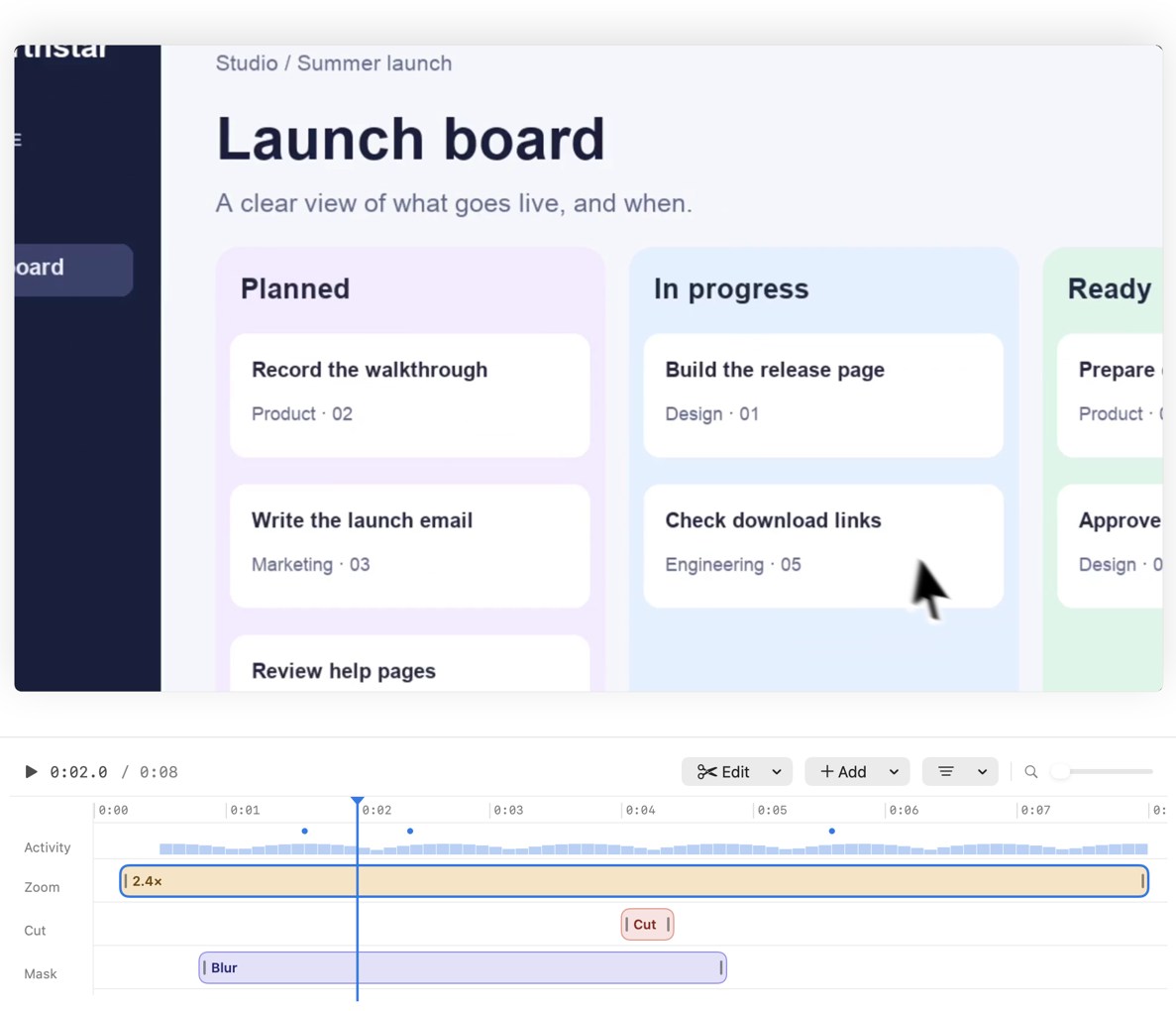
- Suggests zooms from your clicks. Every zoom is a block on the timeline you can move, retime, change the pace of, or delete.
- Camera bubble, split, floating and full-screen layouts, with background removal or blur.
- Trim, cut pauses, speed changes, freeze frames, title and end cards, captions transcribed on your Mac, shortcut key overlays, privacy blur, click ripples and cursor smoothing.
- Exports MP4 (H.264 or HEVC), GIF, and ProRes 4444 with transparency, in 16:9, 4:3, 1:1, 3:4 or 9:16 from the same recording.
- Recordings and edits stay on your Mac. It goes online only for license checks and updates.
What it does not do. There are no share links, comments or viewer analytics. There is no Windows version and no iPhone recording. There is also no free trial, so watch the launch film to judge it before you buy.
Pick MacMuse Recorder if you export MP4s for a product page, a help article or social posts, and you want to pay once. For a walkthrough of the workflow, see how to record a product demo on a Mac.
Is there a free Screen Studio alternative?
Yes, with limits.
- Cap is the most complete free option. It is free for personal use, with auto zoom and 4K export. Commercial use needs a paid license.
- Screenify Studio Free gives you the full editor, but exports carry a watermark, cap at 1080p and stop at 5 minutes.
- OBS Studio is free and open source, and it records the screen with system audio on macOS 13 or later. It has no automatic zoom or cursor effects. It suits streaming and long raw recordings, not polished demos.
If you only need a plain recording with sound, the Mac’s built-in tools may be enough. Our guide on how to screen record on Mac with sound covers what they can and can’t capture.
Who should stay with Screen Studio?
Stay with Screen Studio if:
- You share most videos as links and use comments, view counts or shared projects.
- You edit by transcript or remove filler words often.
- You record an iPhone or iPad over USB.
- You already own an old one-time license. Renewing may cost less than switching.
- Your company pays and $9 a month is not a concern. Its polish is a real advantage.
Switch if you mostly export files, dislike subscriptions, or need Windows.
Which Screen Studio alternative should you pick?
- Free, open source, or Linux: Cap.
- Mac and Windows: FocuSee.
- 3D camera moves and device mockups: Screenify Studio.
- Closest one-time match to Screen Studio, with share links: Screen Charm.
- Try the full editor free first: CursorClip.
- Lowest one-time price for local MP4, GIF and ProRes export: MacMuse Recorder.
- Share links with feedback on a Mac: stay with Screen Studio, or use Cap Pro. If async video messages are the main job, see our Loom alternative for Mac guide.
For a wider look beyond auto-zoom apps, read the best screen recorder for Mac.
FAQ
Is Screen Studio a one-time purchase?
Not anymore for new buyers. Screen Studio costs $29 a month or $9 a month on the yearly plan. Its FAQ says one-time licenses are no longer sold, though old ones still work.
What is the cheapest Screen Studio alternative?
Cap is free for personal use. For a paid, one-time license, MacMuse Recorder costs $19.99 for one Mac, and Cap’s Desktop License costs $58 once.
Which Screen Studio alternative works on Windows?
Cap runs on Mac, Windows and Linux. FocuSee runs on Mac and Windows. Screen Studio, Screenify Studio and MacMuse Recorder are Mac-only.
Can I edit automatic zooms in these apps?
Yes, in all five apps the zooms live on a timeline. Cap lets you move and resize zoom segments. FocuSee lets you adjust, split or turn off zooms. MacMuse Recorder lets you move, retime, change the pace of, or delete each zoom.
Does any alternative keep recordings off the cloud?
Yes. Cap’s Studio Mode, Screenify Studio and Screen Studio all record and edit locally and upload only when you share. MacMuse Recorder has no cloud features at all. It goes online only for license checks and updates.
Try MacMuse Recorder
If you want editable auto zoom, mic and system audio, and local export for a one-time price, see MacMuse Recorder’s features and pricing. It costs $19.99 once for one Mac and runs on Apple silicon Macs with macOS 15 or later.
Get new MacMuse apps first
A short email when a new app ships or an app gets a big update. That’s it.