Folio: find any file on your Mac in seconds
Folio is a fast, private file finder for Mac. Search in plain English, browse every folder, see where downloads came from and clean up gigabytes. macOS 14+, from $9.99 once.
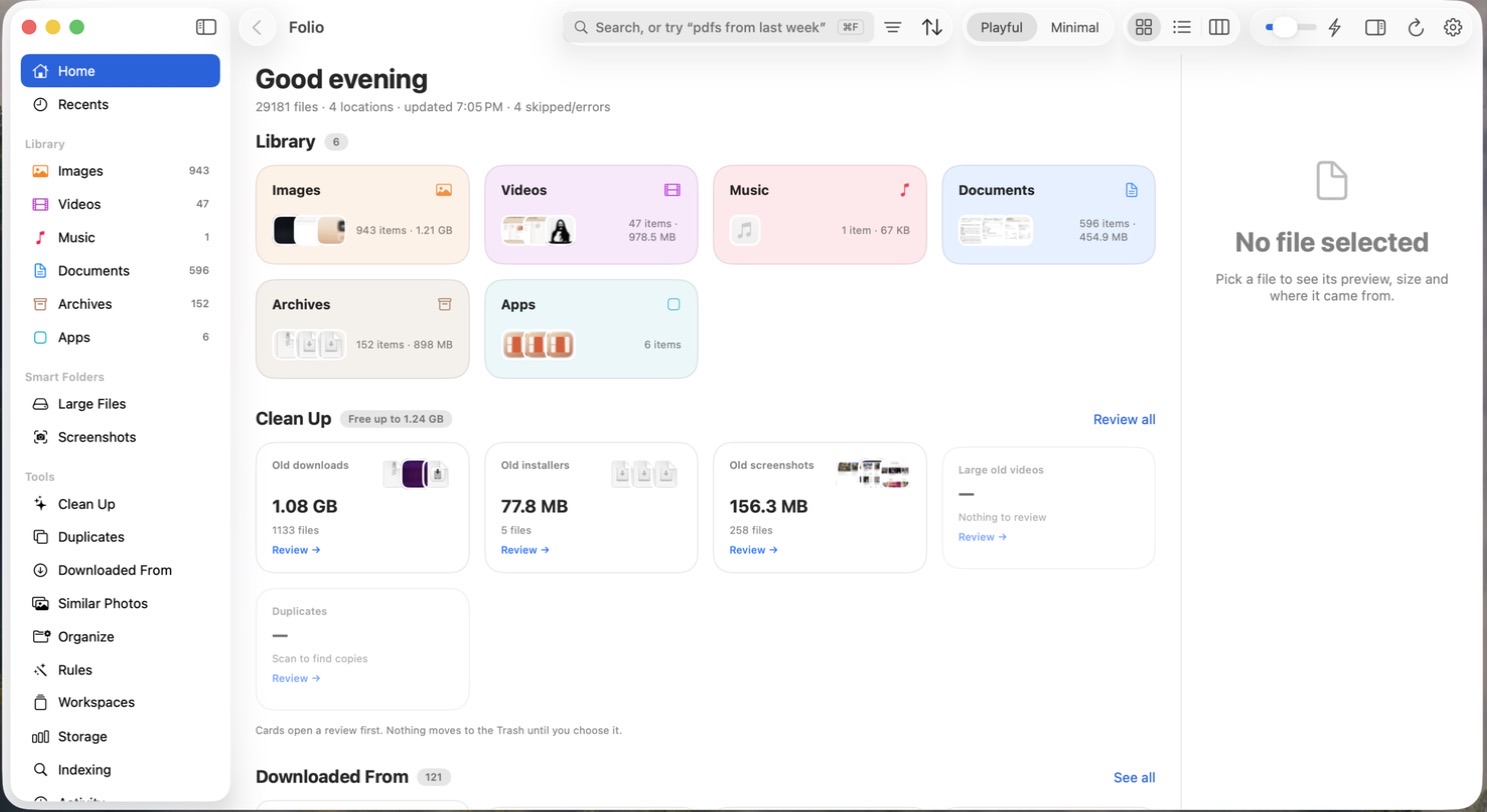
Folio is a native Mac app for finding, browsing and cleaning up the files on your Mac. You type what you’re looking for the way you’d say it, like “pdfs from last week”, and Folio shows it. It runs on macOS 14 Sonoma or later, costs $9.99 once for one Mac, and is available now at folio.macmuse.app, where you can also try a live demo in your browser.
Why is it so hard to find a file on a Mac?
Finder is great at showing you folders. It’s much less helpful when you remember what a file was but not where you put it. Downloads pile up, screenshots land on the Desktop, and that one invoice is somewhere in a folder you named two years ago. Spotlight searches everything on the system, so a quick file search competes with apps, settings and web results.
Folio focuses on your files only, in the folders you choose: Desktop, Documents and Downloads to start, plus any other folder you add.
Search like you talk
Folio understands the way people actually describe files:
| You type | Folio understands |
|---|---|
| pdfs from last week | PDFs · modified in the last week |
| screenshots over 5 MB | Screenshots · larger than 5 MB |
| videos from this month | Videos · this month |
| invoice | Text inside PDFs and documents that mentions “invoice” |
Every search shows how Folio read it, as chips you can remove one at a time. Folio also reads the text inside PDFs, plain-text documents and screenshots, so searching for a word finds the document that contains it, not just a file named after it.
Every file, sorted for you
The Home screen sorts your library by kind (Images, Videos, Music, Documents, Archives and Apps) with real thumbnails and counts. Documents means actual documents such as PDFs, Word, Pages, Keynote and spreadsheets, not the thousands of code and config files a developer folder holds. Software projects and dependency folders like node_modules stay out of your library, though you can still browse into them.
Browse every folder Finder shows
Folio’s sidebar lists the places Finder does: your home folder, Desktop, Documents, Downloads, Pictures, Movies, Music, Applications and iCloud Drive. Open any of them to see folders and files together in a grid, a list or columns, with a path bar you can click to jump back up.
Know where every download came from
macOS quietly records where each download came from. Folio uses that to group your Downloads by source, so “that PDF someone sent me in Gmail” or “the file ChatGPT gave me” is one click away. Gmail, Google Drive, ChatGPT, Slack, GitHub and other sites each get their own group.
Free up space without the worry
Clean Up totals the usual suspects: old downloads, old installers, old screenshots, large old videos and exact duplicates. You review everything first, pick what goes, and it all goes to the Trash, so you can put it back. Folio never deletes anything on its own.
Quick Search from any app
Press ⇧⌘Space anywhere and a Spotlight-style panel opens with just your files. Arrow down, press Return to open a file, ⌘Return to show it in Folio or ⌥Return to show it in Finder.
Private by design
Folio indexes and searches on your Mac. It goes online only to activate or check your license and to look for updates. There’s no account, no analytics and no crash reporting, and file names and contents never leave your Mac. It’s a native Swift app, a 3.7 MB download, signed and notarized by Apple, and it runs on both Apple silicon and Intel Macs.
How much does Folio cost?
Folio is a one-time purchase, with every 1.x update included:
| License | Price |
|---|---|
| 1 Mac | $9.99 |
| 3 Macs | $19.99 |
| 5 Macs | $29.99 |
There’s no free trial, and all sales are final. Instead, the live demo lets you try the search, folders and cleanup in your browser before you buy.
Get Folio
Get Folio at folio.macmuse.app. Questions or ideas? Write to support@macmuse.app.
Get new MacMuse apps first
A short email when a new app ships or an app gets a big update. That’s it.