Must-have Mac apps for 2026, and what each one costs
22 must-have Mac apps for 2026, sorted by job, from windows and screenshots to files and AI. Each says if it's free, paid once or a subscription.
The must-have Mac apps in 2026 are the ones that fix what macOS still leaves rough: Raycast or Alfred to launch things, Rectangle to arrange windows, CleanShot X or Shottr for screenshots, Maccy for clipboard history, Ice for a crowded menu bar, and AppCleaner to uninstall apps properly. Most of the 22 picks below are free or sold once, and every entry says which, so you can skip subscriptions if you want to.
We sorted this list of the best Mac apps for 2026 by job, not by popularity. Each pick gets a short entry on what it does and how you pay for it.
A disclosure up front: MacMuse is a one-person studio, and four of these picks are ours: Snug, MacMuse Recorder, Folio and Beckon. Each is marked “we make this.” We included them only where they fit the job, and we list an alternative next to each one.
What are the must-have Mac apps in 2026?
Here’s the short version. Details for each pick follow.
| Job | Pick | How you pay |
|---|---|---|
| Window management | Rectangle | Free (Pro is a one-time purchase) |
| Window management | Snug (we make this) | $14.99 once |
| Launcher | Raycast | Free (AI needs a subscription) |
| Launcher | Alfred | Free (Powerpack from £34) |
| Screenshots | CleanShot X | $35 once |
| Screenshots | Shottr | Free, pay what you want |
| Screen recording | MacMuse Recorder (we make this) | $19.99 once |
| Files | Folio (we make this) | $9.99 once |
| Uninstalling apps | AppCleaner | Free |
| Archives | The Unarchiver | Free |
| Clipboard | Maccy | Free ($9.99 on the App Store) |
| Menu bar | Ice | Free |
| Menu bar | Bartender | One-time purchase |
| Notes | Obsidian | Free (Sync is a subscription) |
| System monitor | Stats | Free |
| Keep awake | Amphetamine | Free |
| Video player | IINA | Free |
| Developer tools | Homebrew | Free |
| Terminal | Ghostty | Free |
| AI chat | ChatGPT and Claude | Free tiers, paid plans |
| AI on your screen | Beckon (we make this) | $39 once |
Prices and features checked on November 10, 2026.
What’s the best window manager for Mac?
First, try what’s built in. macOS can tile windows when you drag them to a screen edge or corner, or when you hover over the green button. If that covers you, stop there.
Rectangle is the next step. It moves and resizes windows with keyboard shortcuts or snap areas. It’s free and open source and runs on macOS 14 or later. Rectangle Pro, the paid version, is a one-time, lifetime purchase that works on three Macs at once, with a 10-day trial.
Snug (we make this) takes a different approach: it tiles each new window the moment it opens, and the others reflow when one closes. You pick a layout per display, such as columns, a grid or Center Stage for ultrawide screens, and it remembers arrangements when you plug in or unplug a monitor. It needs macOS 15 or later and costs $14.99 once for one Mac. Choose Rectangle if you want to place windows yourself, and Snug if you want them placed for you. Our guide to Mac window managers compares more options.
Which launcher should you use instead of Spotlight?
Raycast is the launcher most Mac users try first. The free plan includes clipboard history (kept for three months), snippets, quicklinks, window management and thousands of extensions. AI features need a paid plan: Pro is $10 a month or $96 a year. Note that the current version requires macOS Tahoe and an Apple silicon Mac.
Alfred is the long-running alternative, and it runs on Intel Macs too (macOS 10.14 or later). The core app is free forever. The Powerpack, which adds workflows and themes, costs £34 for an Alfred 5 license or £59 with free lifetime upgrades.
What’s the best screenshot and screen recording app for Mac?
CleanShot X is the most complete screenshot tool on the Mac. The Basic plan is $35 once and includes a year of updates and 1 GB of cloud storage. After that year, renewing updates is optional at $19. A Pro plan ($10 per user per month, billed annually) adds unlimited cloud storage and team features.
Shottr is the free alternative. It does scrolling captures of long pages, OCR that copies text from any part of the screen, and annotation. It’s free to use for as long as you want, and you can pay what you like to support it.
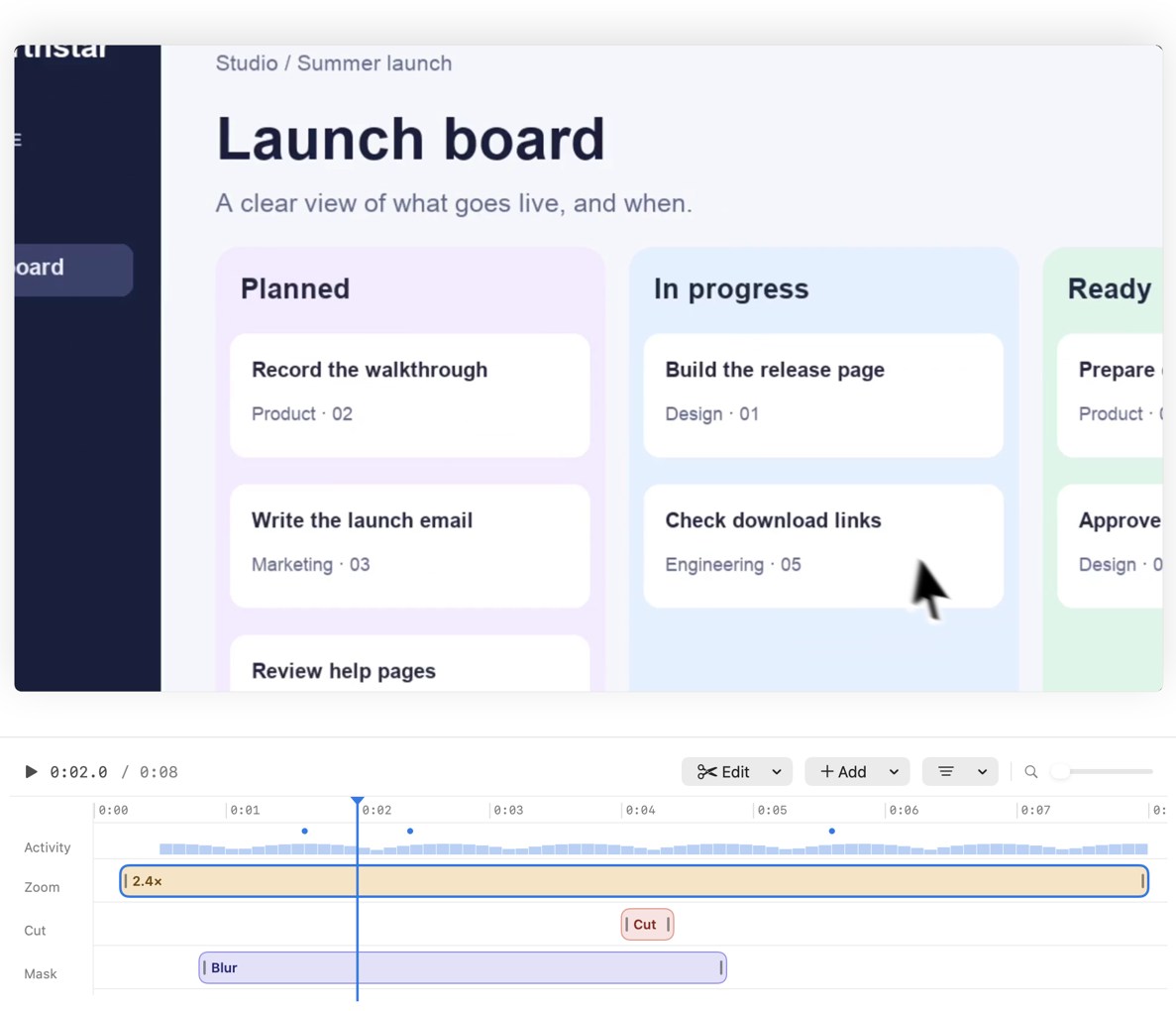
MacMuse Recorder (we make this) is for screen recordings you’ll share, such as product demos and tutorials. It suggests zooms from your clicks, and each zoom is a block on the timeline you can move, retime or delete. It adds a camera bubble, captions transcribed on your Mac, and exports to MP4, GIF or ProRes. It runs on Apple silicon Macs with macOS 15 or later and costs $19.99 once for one Mac. Be aware that it has no free trial and no cloud share links like Loom. Our screen recorder comparison covers free and paid options.
How do you find and clean up files on a Mac?
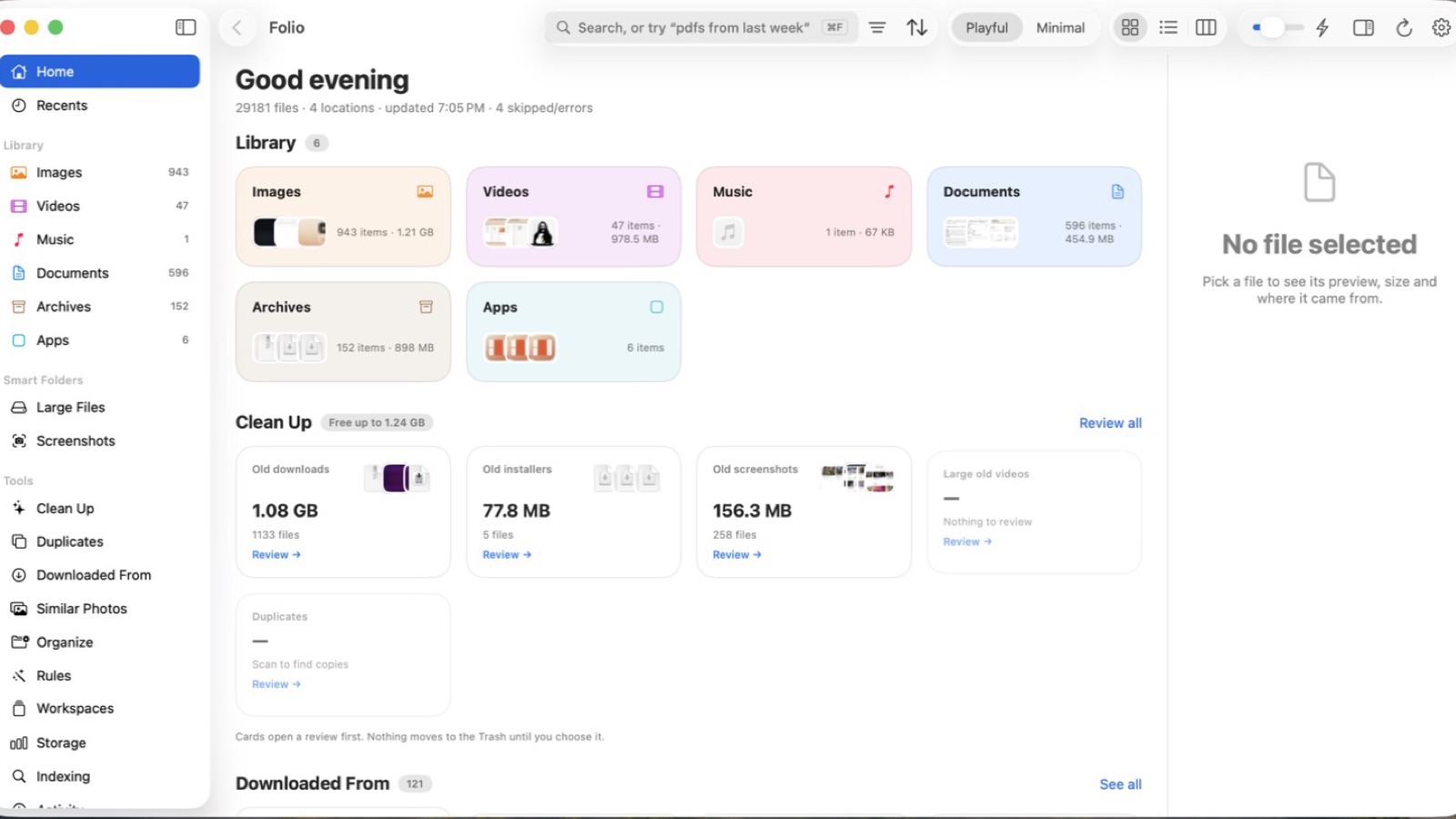
Folio (we make this) is a file finder for the files you made and downloaded. You search in plain English, like “pdfs from last week” or “screenshots over 5 MB,” and it reads inside PDFs. Its Clean Up view totals old downloads, forgotten installers and exact duplicates, and anything you remove goes to the Trash first. It needs macOS 14 or later and costs $9.99 once for one Mac. For a free route with Finder and Spotlight, see how to find a file on Mac.
AppCleaner is how you uninstall apps properly. Drop an app on its window, and it finds the support files the app left around the system. It’s a free download (donations welcome). Version 3.7 needs macOS 15 or later, and older versions are available for older Macs.
The Unarchiver opens many archive formats, including RAR, 7z and ISO disc images. It’s free, with no in-app purchases, from the Mac App Store or its website.
Do you need a clipboard manager on Mac?
Maybe not anymore. Since macOS Tahoe, Spotlight keeps a clipboard history: press Command-Space, then Command-4.
If you want a dedicated app, Maccy is the one to get. It’s keyboard-first, fast, and keeps your history on your Mac. It’s free and open source (MIT license) from its website and needs macOS 14 or later. The Mac App Store version costs $9.99, which is a way to support the developer.
How do you tidy a crowded menu bar?
Ice hides and shows menu bar items, with a search panel, drag-and-drop arrangement and hotkeys. It’s free and open source (GPL-3.0) and needs macOS 14 or later. Install it with brew install --cask jordanbaird-ice. Check its releases page before upgrading macOS, since fixes for Tahoe shipped first as pre-release builds.
Bartender is the paid, polished option. Bartender 7 is a one-time purchase, and there’s also a yearly Pro option and a four-week free trial. Bartender 7 is built for macOS 27, and a Bartender 7 license also runs Bartender 6 if you’re on Tahoe.
What’s the best notes app for Mac?
Obsidian is our pick for long-lived notes. It stores notes on your Mac as plain-text Markdown files, so you’re never locked in. It’s free without limits, including at work. Sync ($4 a month billed annually) and Publish ($8 a month billed annually) are optional subscriptions.
Which small utilities are worth installing?
- Stats puts CPU, GPU, memory, disk, network and battery readings in your menu bar. Free and open source (MIT), macOS 12 or later. Install it with
brew install stats. - Amphetamine keeps your Mac awake for a set time, while a file downloads, or while an app runs. It’s 100% free on the Mac App Store, with no in-app purchases.
- IINA is a modern video player for macOS, built on mpv. Free and open source, with no tracking.
What are the best Mac apps for developers?
Homebrew comes first. It installs command-line tools and apps with one command, and several picks in this list install through it. It’s a volunteer-run, non-profit project funded by donations.
Ghostty is a fast terminal that uses native macOS UI and GPU acceleration. It’s free and open source (MIT).
Developers will also get the most out of Raycast’s extensions, and out of Claude Code, which runs inside the Claude desktop app with diff review and a live app preview.
Which AI apps belong on a Mac?
ChatGPT and Claude both have native desktop apps with free tiers and paid plans. ChatGPT’s desktop app now includes Codex for coding work. Claude’s app includes quick entry, opened by double-tapping Option, which can attach a screenshot or an app window to your question. Claude Pro is $20 a month, or $17 a month billed annually.
Beckon (we make this) isn’t a chatbot. Press ⌥⇧Space in any app, and a bar rises with what you’re looking at already attached: the page in your browser, the file and repo changes in your editor, or the error in your terminal. Claude Code, Codex, ChatGPT, Cursor and other agents answer in the bar, using the subscriptions you already pay for. It needs macOS 26 Tahoe or later and costs $39 once, or $5.99 for a 7-day pass. We compare all of these in the best AI assistant for Mac.
Which Mac apps have no subscription?
Many readers want a set of Mac apps without subscriptions. Here are the picks that fit, in two groups.
Free picks only:
- Rectangle (window management)
- Raycast, free plan (launcher)
- Alfred, without the Powerpack (launcher)
- Shottr (screenshots)
- AppCleaner (uninstalling)
- The Unarchiver (archives)
- Maccy (clipboard)
- Ice (menu bar)
- Obsidian (notes)
- Stats (system monitor)
- Amphetamine (keep awake)
- IINA (video)
- Homebrew and Ghostty (developers)
One-time purchase picks:
- Rectangle Pro (window management)
- Alfred Powerpack, £34 or £59 (launcher)
- CleanShot X Basic, $35 with a year of updates (screenshots)
- Bartender 7 (menu bar)
- Snug, $14.99 (we make this)
- MacMuse Recorder, $19.99 (we make this)
- Folio, $9.99 (we make this)
- Beckon, $39 (we make this; it uses AI subscriptions you already have)
Prices and features checked on November 10, 2026. If you’d like to know why we sell our own apps this way, we wrote about building small, pay-once Mac apps.
FAQ
What’s the first app to install on a new Mac?
Install a launcher first, either Raycast or Alfred. A launcher replaces a lot of clicking, and Raycast’s free plan also covers clipboard history, snippets and window snapping, so it can stand in for three other apps.
Are free Mac apps safe to install?
The free picks here come from their official sites, GitHub pages or the Mac App Store. Download from those sources, not from mirror sites. Maccy’s site, for example, warns that maccy.app is its only official website.
What are the best productivity apps for Mac?
The best productivity apps for Mac are the ones that remove repeated steps: a launcher (Raycast or Alfred), a window manager (Rectangle or Snug), a clipboard history (Spotlight or Maccy) and a notes app you’ll keep using (Obsidian). Start with those four, and add the rest only when you hit a specific problem.
Can you avoid subscriptions on a Mac entirely?
Mostly, yes. Every job in this list has a free or one-time option. The main exception is AI: models cost money to run, so AI features usually come with a subscription. Beckon is a one-time purchase, but it uses an AI subscription you already have.
Get new MacMuse apps first
A short email when a new app ships or an app gets a big update. That’s it.