Snug vs AeroSpace: Mac tiling window managers compared
Snug vs AeroSpace: both auto-tile Mac windows. AeroSpace is free, keyboard-first and set up in TOML; Snug uses a settings window. Who should pick which.
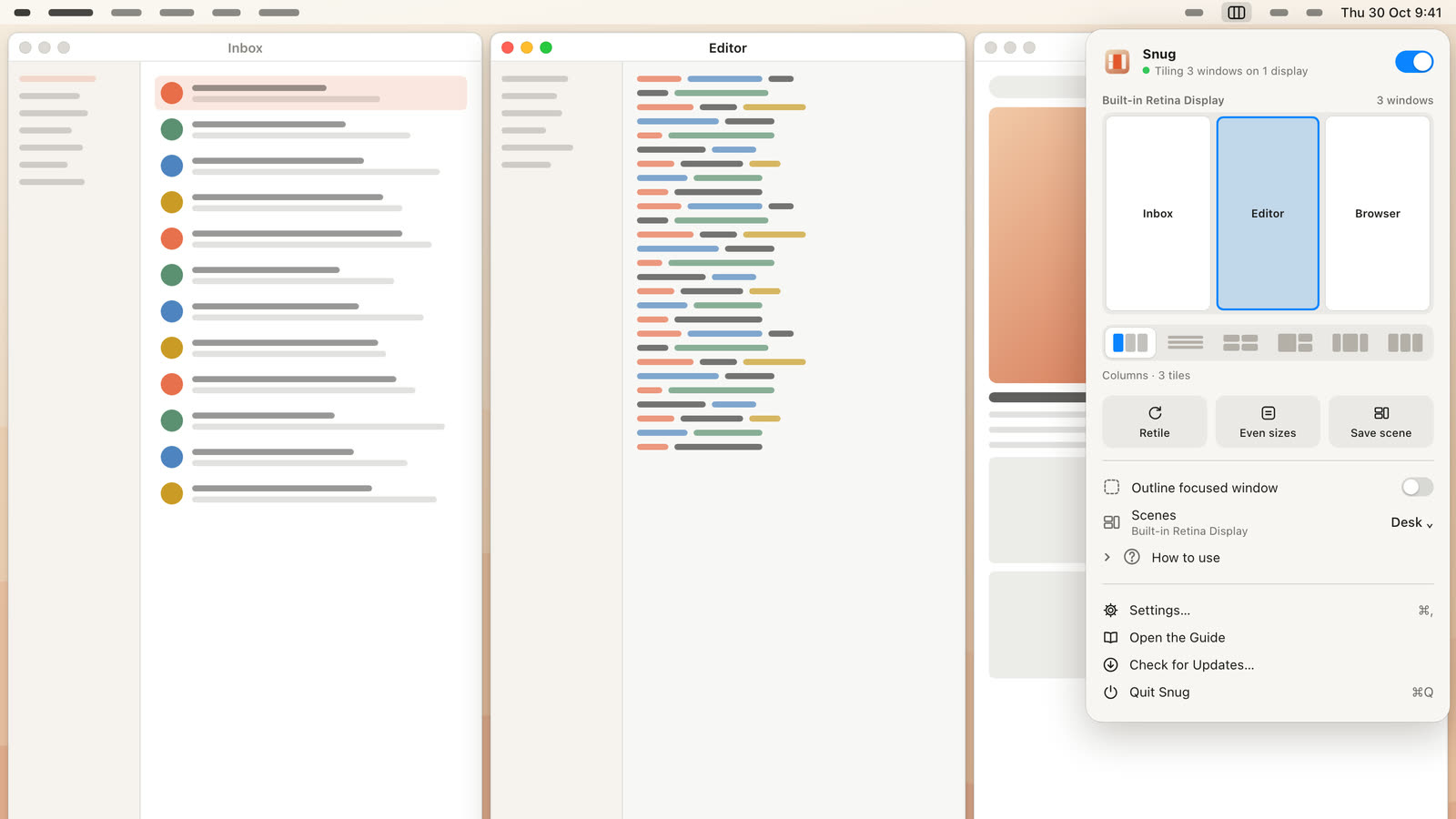
Pick AeroSpace if you want free, keyboard-first tiling in the style of i3, with your whole setup in a dotfile and its own fast workspaces. Pick Snug if you want auto-tiling you set up in a settings window, control with the mouse, and layouts that come back when you dock a laptop. Both tile new windows as they open, so the choice is mostly about how you like to work.
We make Snug, so read this with that in mind. Every AeroSpace fact below comes from the AeroSpace GitHub repo or the AeroSpace guide, and each yabai fact from the yabai repo.
Snug vs AeroSpace at a glance
Prices and features checked on November 11, 2026.
| Snug | AeroSpace | |
|---|---|---|
| Price and model | $14.99 once for 1 Mac, $19.99 for 2 | Free, open source (MIT) |
| macOS | 15 or later | 13 or later |
| How it works | Auto-tiling with preset layouts per display | Auto-tiling in an i3-style tree of tiles and accordions |
| Setup | Settings window | TOML config file (~/.aerospace.toml) and a command line tool |
| Permissions | Accessibility; no Screen Recording | Uses macOS’s public accessibility APIs; never requires disabling SIP |
| Key features | Center Stage, width cap, Chains, docking scenes, drag to swap and resize | Its own workspaces, per-app rules, keyboard bindings for everything, multi-monitor workspace assignment |
| Status | Version 1.1.0 | Public beta; breaking changes expected until 1.0 |
| Trial | No trial; working demo on its site | Free |
SIP is System Integrity Protection, a macOS security feature. Neither app asks you to turn it off.
Where AeroSpace is better
AeroSpace is free, open source and built for people who want to stay on the keyboard.
- It’s free. MIT licensed, with more than 23,000 stars on GitHub. Snug costs $14.99.
- It’s keyboard-first. Every action is a command you bind to a key. It also has a command line tool with man pages and shell completion, so you can script it.
- Your setup lives in a text file. The config is plain-text TOML, which the project calls “dotfiles friendly.” It moves to a new Mac with the rest of your dotfiles.
- Its own workspaces. AeroSpace replaces macOS Spaces with its own workspaces and switches between them with no animation. The project says this avoids Spaces’ “considerable limitations.”
- A flexible tree. Containers can be horizontal or vertical tiles or accordions, and you can nest them. If you used i3 on Linux, it will feel familiar.
- Per-app rules. The
on-window-detectedcallbacks can send an app to a workspace by its bundle ID, or float its windows. - It runs on older Macs. AeroSpace runs on macOS 13. Snug needs macOS 15.
A few setup notes from the project itself. You install it with Homebrew. The guide recommends turning off “Displays have separate Spaces” in System Settings. Windows on hidden workspaces are moved off the visible screen to a corner, and a 1-pixel sliver can show. And it’s a public beta, so the project warns to “expect breaking changes until 1.0.”
Where Snug is better
Snug is for people who want auto-tiling without learning a config format.
- No config file. Everything is in a settings window. You pick a layout and it starts tiling.
- Mouse control. Drag a window onto another to swap them, Option-drag to stack, and drag the gaps to resize. AeroSpace’s README and guide focus on keyboard commands and don’t describe resizing with the mouse.
- Layouts made for wide screens. Choose columns, rows, grid, side, thirds or Center Stage per display. Center Stage keeps your main window centered on an ultrawide with columns on each side, and a width cap stops tiles from stretching too far.
- Docking scenes. Snug remembers the arrangement for each display setup and restores it when you plug in or unplug. You don’t write rules for it.
- Chains. Windows sit in one straight line that runs off the screen edge, and ⌃⌥ + arrow slides along it. ⌃⌥R cycles width, ⌃⌥F goes full width and ⌃⌥] stacks into a column. Snug 1.1 added Chains.
- Fast placement. Snug places a new window in 78 ms, measured on its performance page. The rest reflow when one closes.
- Privacy. It reads window position, size and owning app only. No screenshots, no Screen Recording permission and no analytics in the app.
AeroSpace vs yabai
If you’re comparing free config-file tilers, yabai is the other big name. It describes itself as “a tiling window manager for macOS based on binary space partitioning.” It’s MIT licensed and controlled from the command line, and you pair it with a hotkey tool such as skhd, which the same author makes.
The main difference is SIP. yabai’s core tiling works without changes. Some features, like controlling Spaces, need SIP partly disabled so yabai can load a scripting addition into the Dock. AeroSpace says it “will never require you to disable SIP” and uses its own workspaces instead of Spaces.
- Pick AeroSpace if you liked i3, want a TOML file and want to leave SIP alone.
- Pick yabai if you want binary space partitioning and the deepest control, and you’re fine with changing SIP for the extras.
- Pick Snug if you don’t want to maintain a config for either one.
Who should choose which
- Choose AeroSpace if you want a free tiler, live on the keyboard, and like keeping your setup in dotfiles.
- Choose Snug if you want tiling that works from a settings window, you use the mouse as much as the keyboard, or you move a laptop between displays and want your layout back.
- Choose a snapping app if you’d rather place windows yourself. Rectangle is free; see our Snug vs Rectangle comparison and the guide on how to snap windows on Mac.
For the full field, including Amethyst and Moom, see our best window manager for Mac roundup.
FAQ
Is the AeroSpace window manager free?
Yes. AeroSpace is free and open source under the MIT license. You install it with Homebrew.
Does AeroSpace need SIP disabled?
No. The project says AeroSpace “will never require you to disable SIP.” yabai is the tiler where some features need SIP partly disabled.
Is there an AeroSpace alternative without a config file?
Snug tiles new windows automatically and you set it up in a settings window. It costs $14.99 once for one Mac and needs macOS 15 or later.
Is AeroSpace stable enough to use every day?
The project calls it a public beta that “can be used as a daily driver,” and warns of breaking changes until version 1.0.
Try Snug’s demo
If you like the idea of AeroSpace but don’t want to write a config file, try Snug first in your browser. The Snug website has a working demo where you can drag windows and gaps and close windows to watch the rest reflow. The Snug launch post covers the details.
Get new MacMuse apps first
A short email when a new app ships or an app gets a big update. That’s it.