Snug vs Rectangle: auto-tiling or snapping on Mac?
Snug vs Rectangle: free snapping or paid auto-tiling on Mac? Prices, setup, permissions and who should pick each, plus how Rectangle Pro fits in.
Pick Rectangle if you want to snap windows into halves, thirds and corners with a shortcut or a drag, and you want it free. Pick Snug if you want every new window tiled for you without pressing anything, and your layout back each time you dock a laptop. Rectangle Pro sits in between: $9.99 for snapping plus app layouts you set up and trigger.
We make Snug, so weigh our view with that in mind. Every Rectangle fact below comes from Rectangle’s site, the Rectangle Pro page or the Rectangle GitHub repo.
Snug vs Rectangle at a glance
Prices and features checked on November 11, 2026.
| Snug | Rectangle | Rectangle Pro | |
|---|---|---|---|
| Price and model | $14.99 once for 1 Mac, $19.99 for 2 | Free, open source (MIT) | $9.99, one license active on 3 devices |
| macOS | 15 or later | 14 or later (older builds for 10.13 to 13) | 13.5 or later |
| How it works | Auto-tiling: places each new window as it opens | Snapping: moves a window when you press a key or drag | Snapping, plus saved app layouts |
| Setup | Settings window | Settings window; JSON import and export | Settings window; iCloud sync |
| Permissions | Accessibility; no Screen Recording | Accessibility | Accessibility |
| Key features | Layouts per display, Center Stage, Chains, docking scenes, drag to swap | Halves to ninths, repeat to cycle sizes, Tile All, Todo mode, URL actions | Custom snap areas, window throw to 16 positions, layouts on display connect, Stash |
| Trial | No trial; working demo on its site | Free | 10-day free trial |
macOS only lets an app move another app’s windows if you grant it Accessibility access, so all three ask for it. Snug reads window position, size and owning app only. It takes no screenshots and never asks for Screen Recording.
How snapping and auto-tiling differ
Rectangle waits for you. You press a shortcut or drag a window to an edge, and that one window moves. Its README says it “does not rearrange windows automatically.” Opening or closing a window moves nothing else.
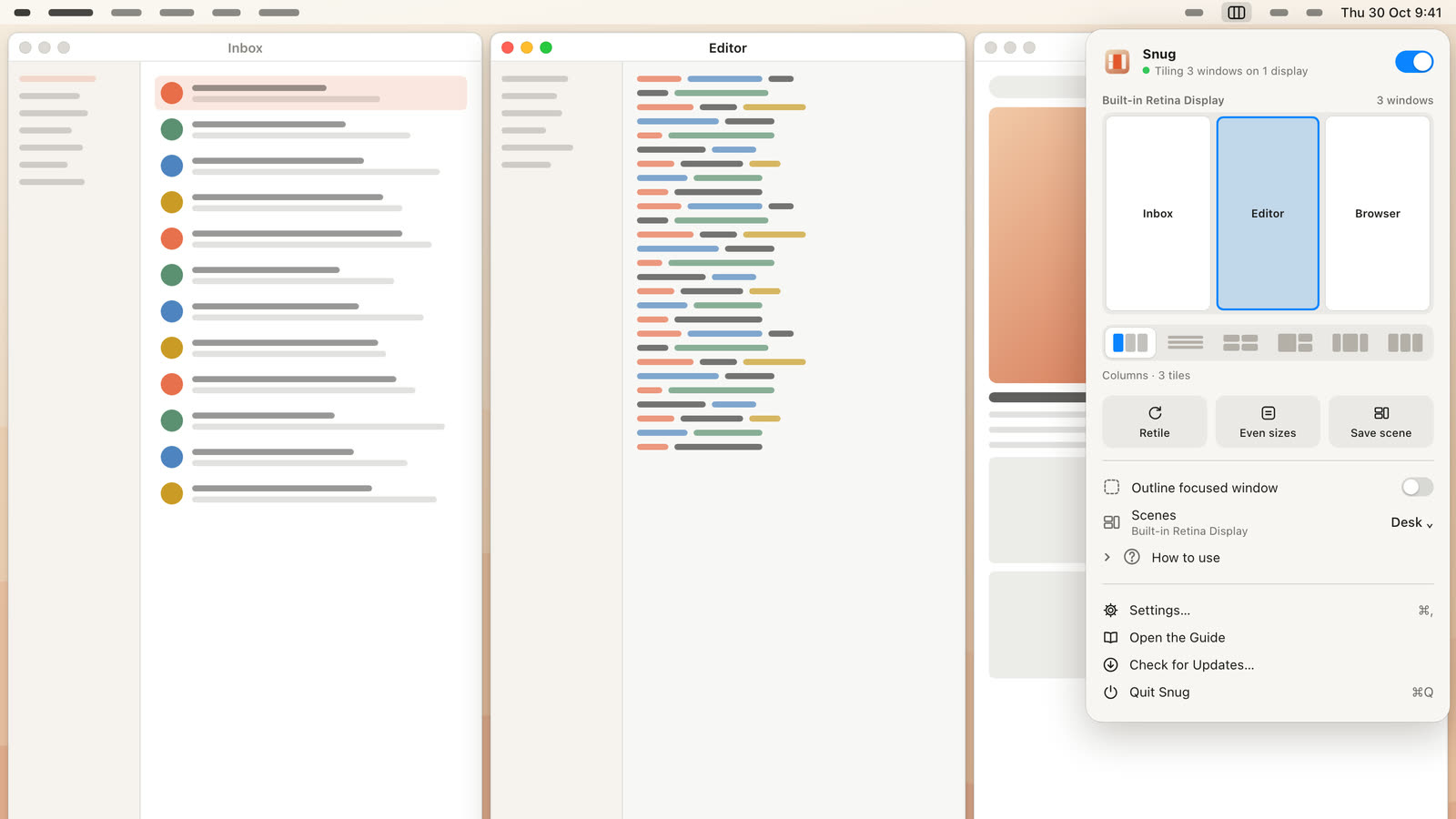
Snug acts on its own. When a new window opens, Snug gives it a slot (in 78 ms, measured on Snug’s performance page) and the other windows make room. When one closes, the rest reflow to fill the gap.
Neither approach is better for everyone. Snapping never surprises you. Auto-tiling saves the same drag-and-resize work you would repeat all day, but windows land where the layout puts them, not where you drop them. Our guide to Mac window managers explains the split in more detail.
Where Rectangle is better
Rectangle is a strong free app, and for many people it is all they need.
- It’s free and open source. It’s MIT licensed with more than 30,000 stars on GitHub. Snug costs $14.99.
- It runs on more Macs. Rectangle supports macOS 14 and later, and the project keeps older builds for macOS 10.13 through 13. Snug needs macOS 15.
- It has a key for every position. Halves, thirds, fourths, sixths, eighths and ninths, plus center, maximize and move to the next display. Press the same shortcut again and it cycles through sizes.
- It can tile on demand. Tile All, Tile in Rows and Tile in Columns arrange the windows on a display with one press, and repeating the shortcut cycles through grid layouts. You get a tidy grid when you ask for it, and nothing moves on its own afterward.
- It’s easy to script and move. Any action can run from a
rectangle://execute-actionURL. You can export your settings as JSON, and install withbrew install --cask rectangle. - Todo mode. It keeps one app pinned as a sidebar while other windows fill the rest of the screen.
- There’s nothing to lose by trying it. It’s free, and Rectangle Pro has a 10-day trial. Snug has no trial. It has a working demo on its site instead.
Where Snug is better
Snug is for people who want windows placed without asking.
- New windows place themselves. Open a browser window, a terminal and an editor, and they tile as they open. You never press a key to tidy up.
- Layouts per display. Pick columns, rows, grid, side, thirds or Center Stage for each display. Center Stage keeps your main window centered on an ultrawide, with columns on each side. A width cap stops tiles from stretching across very wide screens.
- Docking scenes. Snug remembers the arrangement for each display setup. Plug into your desk monitor and your layout comes back. Unplug and it returns to the laptop layout.
- Chains. Windows sit in one straight line that runs off the screen edge. ⌃⌥ + arrow slides along it, ⌃⌥R cycles a window’s width, ⌃⌥F makes it full width, and ⌃⌥] stacks windows into a column. Snug 1.1 added Chains.
- Mouse control. Drag a window onto another to swap them, Option-drag to stack, and drag the gaps to resize. Stacks show a count badge, and there’s a focus mode.
- Privacy. No screenshots, no Screen Recording permission and no analytics in the app.
Rectangle Pro vs Snug
If you searched for a Rectangle Pro alternative, here is the honest split. Rectangle Pro is cheaper at $9.99, has a 10-day trial, and one license is active on 3 devices. Snug is $14.99 for one Mac or $19.99 for two.
Both can bring a layout back when you connect a display. Rectangle Pro does it with app layouts you build, which arrange a set of apps with one shortcut and can run when displays connect or disconnect. Snug remembers the arrangement you had for each display setup and restores it. Rectangle Pro also adds custom snap areas anywhere on screen, a one-key “window throw” to 16 positions, and Stash, which hides windows at a screen edge until your pointer touches it.
The real difference is the same as with free Rectangle. Rectangle Pro moves windows when you tell it to. Snug moves them when they open and close.
Who should choose which
- Choose Rectangle if you want free, reliable snapping, you’re on macOS 14, or you like knowing exactly where every window goes.
- Choose Rectangle Pro if you want snapping plus saved layouts tied to your displays, and you never want windows moving on their own.
- Choose Snug if you want every window tiled automatically with no config file, you use an ultrawide, or you dock a laptop to different displays and want your layout back each time.
- Try macOS first if you only snap a few windows a day. Our guide on how to snap windows on Mac covers the built-in options.
FAQ
Does Rectangle tile windows automatically?
No. Rectangle’s README says it “does not rearrange windows automatically.” It moves windows when you press a shortcut or drag to a snap area. Its Tile All and Tile in Rows or Columns shortcuts arrange every window on a display, but only when you press them.
Is there a free Rectangle alternative that auto-tiles?
Yes. AeroSpace is free, open source and tiles new windows automatically, but you set it up in a TOML config file. See our Snug vs AeroSpace comparison.
Is Snug a subscription?
No. Snug is $14.99 once for one Mac, or $19.99 for two. There’s no account. Your license key arrives by email after checkout.
Rectangle or Magnet?
Both are snapping apps. Rectangle is free and needs macOS 14. Magnet is $4.99 on the Mac App Store and runs on macOS 13. Our Snug vs Magnet post compares all three.
Try Snug’s demo
If you keep snapping the same windows into the same places every morning, auto-tiling is worth a look. The Snug website has a working demo you can drag around in your browser, plus layouts, docking scenes and pricing. The Snug launch post tells the story behind it.
Get new MacMuse apps first
A short email when a new app ships or an app gets a big update. That’s it.