Snug vs Magnet: snap windows or auto-tile them on Mac?
Snug vs Magnet: $4.99 drag-to-snap from the App Store, or auto-tiling that places every window? Prices, setup and who should pick each, plus Rectangle.
Pick Magnet if you want simple drag-to-snap and shortcuts for $4.99, bought once through the Mac App Store, on macOS 13 or later. Pick Snug if you want every new window tiled for you as it opens, and your layout back when you dock a laptop. If you’re really choosing between Magnet and Rectangle, both are snapping apps: Rectangle is free, and Magnet comes from the App Store.
We make Snug, so read this with that in mind. Magnet facts come from Magnet’s site and its Mac App Store page. Rectangle facts come from rectangleapp.com and the Rectangle GitHub repo.
Snug vs Magnet vs Rectangle at a glance
Prices and features checked on November 11, 2026.
| Snug | Magnet | Rectangle | |
|---|---|---|---|
| Price and model | $14.99 once for 1 Mac, $19.99 for 2 | $4.99 once, Mac App Store, no in-app purchases | Free, open source (MIT) |
| macOS | 15 or later | 13 or later | 14 or later (older builds for 10.13 to 13) |
| How it works | Auto-tiling: places each new window as it opens | Snapping: drag to an edge or corner, or press a shortcut | Snapping: press a shortcut or drag to a snap area |
| Setup | Settings window | Customizable trigger areas and shortcuts; optional iCloud sync | Settings window; JSON import and export |
| Permissions | Accessibility; no Screen Recording | Accessibility | Accessibility |
| Key features | Layouts per display, Center Stage, Chains, docking scenes, drag to swap | Halves, quarters, thirds; up to six external displays; vertical displays; custom commands | Halves to ninths, repeat to cycle sizes, Tile All, Todo mode |
| Trial | No trial; working demo on its site | None listed | Free |
macOS only lets an app move another app’s windows if you grant it Accessibility access, so all three need it. Snug reads window position, size and owning app only, and never asks for Screen Recording.
How Magnet and Snug differ
Magnet moves a window when you ask. Drag a window to a corner and it fills a quarter. Drag it to a side edge for a half, or to the top edge to maximize it. Drag it to the bottom edge for a third, and slide along the edge to widen it to two thirds. You can do the same with keyboard shortcuts or from the menu bar. Windows you don’t touch stay put.
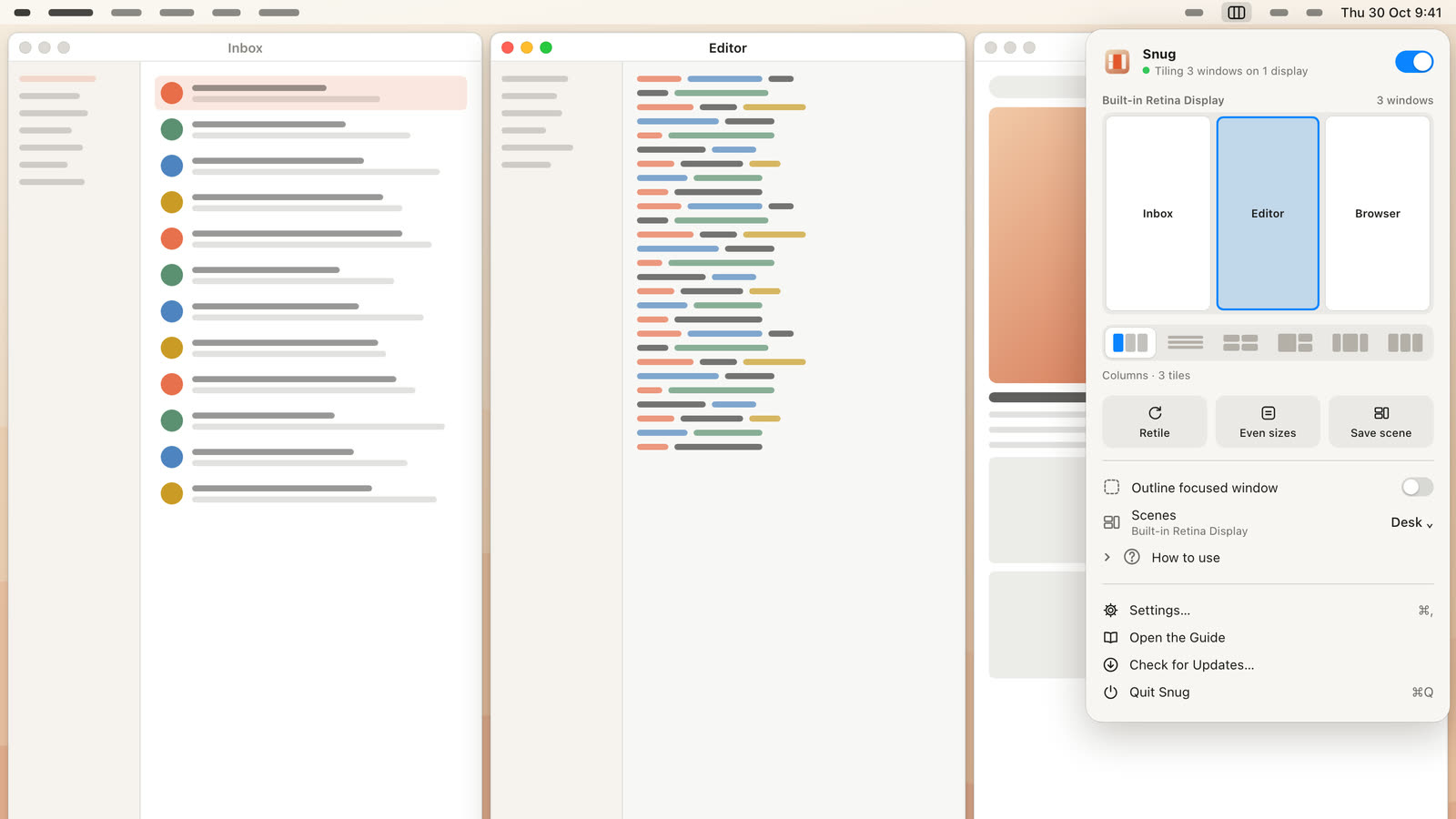
Snug places windows for you. A new window gets a slot the moment it opens (78 ms, measured on Snug’s performance page). The other windows make room, and they reflow when one closes.
Snapping is easier to learn and never surprises you. Auto-tiling saves time once you have many windows open, but windows go where the layout puts them.
Where Magnet is better
Magnet does one job well, and for many people snapping is all they need.
- It costs less. $4.99 once, with no subscription and no in-app purchases. Snug is $14.99.
- You buy it from the App Store. Updates come through the store too. Magnet’s site calls the store “the easiest way” to get it and its free updates.
- It runs on macOS 13. Snug needs macOS 15.
- It’s built for the mouse. The snap areas are easy to learn, and the bottom-edge thirds are handy on wide screens.
- It handles many and odd-shaped displays. Magnet supports up to six external displays. On vertical displays, thirds move to the sides.
- It’s flexible when you need it. The App Store page lists unlimited custom commands, customizable trigger areas and shortcuts, and optional iCloud sync.
- It never moves a window you didn’t touch. If you want full control over every placement, that’s the point.
Where Snug is better
- New windows place themselves. Open a few apps and they tile as they open. Close one and the rest fill the gap.
- Layouts per display. Choose columns, rows, grid, side, thirds or Center Stage for each display. Center Stage keeps your main window centered on an ultrawide with columns on each side, and a width cap stops tiles from stretching too far.
- Docking scenes. Snug remembers the arrangement for each display setup and restores it when you plug in or unplug.
- Chains. Windows sit in one straight line that runs off the screen edge. ⌃⌥ + arrow slides along it, ⌃⌥R cycles width, ⌃⌥F makes a window full width and ⌃⌥] stacks windows into a column. Snug 1.1 added Chains.
- Mouse control for tiles. Drag a window onto another to swap them, Option-drag to stack, and drag the gaps to resize. Stacks show a count badge, and there’s a focus mode.
- Privacy. No screenshots, no Screen Recording permission and no analytics in the app.
Magnet vs Rectangle
Many people searching for a Magnet alternative end up comparing it with Rectangle. Both snap a window when you drag or press a key, and neither tiles new windows on its own. Rectangle’s README says it “does not rearrange windows automatically.”
- Price: Rectangle is free and open source. Magnet is $4.99.
- macOS: Rectangle needs macOS 14 for current versions, with older builds kept for older systems. Magnet needs macOS 13.
- Shortcuts: Rectangle has more positions, from halves down to ninths, and repeating a shortcut cycles sizes. Its Tile All shortcut arranges every window on a display in one press.
- Where you get it: Magnet comes from the Mac App Store. Rectangle is a download from its site or
brew install --cask rectangle.
If you’re on macOS 14 or later, try Rectangle first. It’s free, so you lose nothing. Choose Magnet if you prefer buying through the App Store or you’re on macOS 13. Our Snug vs Rectangle comparison goes deeper on Rectangle and Rectangle Pro.
Who should choose which
- Choose Magnet if you want low-cost, mouse-friendly snapping from the App Store.
- Choose Rectangle if you want free snapping with more keyboard shortcuts.
- Choose Snug if you want windows tiled automatically with no config file, you use an ultrawide, or you dock a laptop and want your layout back each time.
- Try macOS first if you only snap a few windows a day. macOS has built-in window tiling, and our guide on how to snap windows on Mac covers it.
FAQ
Is Magnet a one-time purchase?
Yes. Magnet is $4.99 on the Mac App Store, with no subscription and no in-app purchases.
Does Magnet tile windows automatically?
No. Magnet snaps a window when you drag it to a trigger area, press a shortcut or use the menu. Neither its site nor its App Store page describes tiling new windows on their own.
What is a free alternative to Magnet?
Rectangle is free and open source, and it does the same kind of snapping with more shortcuts. macOS also has basic tiling built in. If you want free auto-tiling instead, see our Snug vs AeroSpace comparison.
Is Snug a subscription?
No. Snug is $14.99 once for one Mac, or $19.99 for two, with no account. It needs macOS 15 or later.
Try Snug’s demo
If you find yourself snapping the same windows into the same spots every day, see what auto-tiling feels like before you buy. The Snug website has a working demo in your browser, plus layouts, docking scenes and pricing. For the full field of options, read our best window manager for Mac roundup.
Get new MacMuse apps first
A short email when a new app ships or an app gets a big update. That’s it.